Fully Local Meeting AI: What Shipped in Hedy 3.2, and What It Costs in Speed
An engineering deep-dive on Hedy 3.2's on-device AI: which models we picked, how they fit on Mac, Windows, and iPhone, and what local inference costs in speed.

Hedy 3.2 can run an entire meeting through your laptop with nothing leaving the device: audio, transcription, summaries, notes, suggestions, all local. Cloud is still our default, and for most users it’s still the right choice. Local is for the people who’d rather hold their conversations on their own hardware, even when that means accepting some speed cost (and on top-tier hardware, it sometimes doesn’t). For the first time we think that tradeoff is honest enough to ship.
Hedy is a meeting coach used by about 30,000 people across Mac, Windows, iOS, Android, and the web. Speech recognition has run locally on every platform since day one. The AI analysis layer (summaries, detailed notes, the in-session chat, the live “what should I say next” suggestions) was always cloud. That’s what changed in 3.2.
This post is about what made that possible in 2026, what models we picked, and what we deliberately did not build. For the user-facing perspective on what local AI means for your meeting workflow — privacy, lawyer/medical/journalist use cases, and how to turn it on — see our Local AI for Meetings overview.
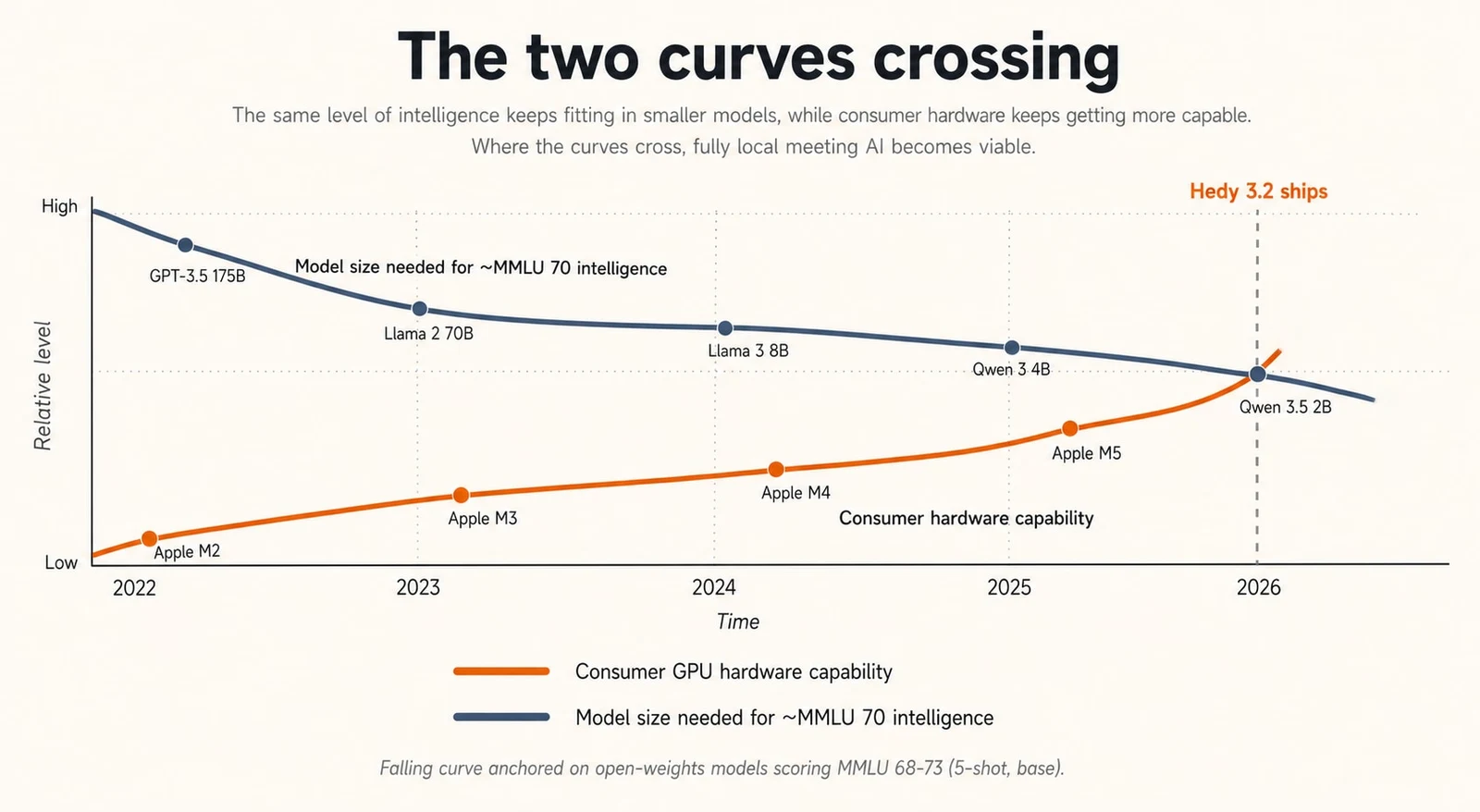
The two curves
There were two trend lines we’d been watching for a couple of years.
The first was open-weights model quality. Llama 2 in mid-2023 was a curiosity for anything beyond a chatbot demo. By late 2024, Llama 3 and Qwen 2.5 were genuinely useful at small sizes, but you still felt the gap on tasks like multi-turn meeting summarization where the model has to track who said what across thirty minutes of dialogue. Through 2025 and into early 2026, two families pulled ahead for our use case: Gemma 4 from Google and Qwen 3.5/3.6 from Alibaba. Both teams have spent serious effort on what you might call density-per-parameter, and between them they cover everything from 2B-class on-device models up to a 35B MoE, with multiple sizes that punch above their weight on instruction following and structured output.
The second curve was consumer hardware. Apple Silicon’s unified memory architecture turned out to be exactly the right shape for transformer inference: model weights live next to the GPU compute, no PCIe round trip, no separate VRAM budget. By the M3 generation, a baseline 16GB MacBook Air could run a quantized 8-9B model at usable speeds. Windows took a different path. Discrete GPUs with 8-12GB of VRAM are common in any machine sold for gaming or content creation, and Vulkan-based inference frameworks now extract most of that performance from NVIDIA, AMD, and (increasingly) Intel hardware.
The two curves crossed in early 2026. We could pick a model that did our job well, and there was an installed base of consumer hardware that could run it. So we shipped.
What we picked, and why
The runtime underneath is llama.cpp, vendored as a submodule and built per-platform with the appropriate backend. We use GGUF quantized weights from Unsloth’s HuggingFace builds, which is currently the cleanest source of well-quantized open-weights models in this size range.
The active catalog at ship is:
| Model | Quant | File size | RAM at load | Quality |
|---|---|---|---|---|
| Qwen 3.5 2B | Q4_K_M | 1.2 GB | 3 GB | ★ |
| Qwen 3.5 4B | Q4_K_M | 2.6 GB | 4.5 GB | ★ |
| Gemma 4 E2B | Q4_K_M | 2.9 GB | 5 GB | ★ |
| Gemma 4 E4B | Q4_K_M | 4.6 GB | 7 GB | ★★ |
| Qwen 3.5 9B | Q4_K_M | 5.3 GB | 8 GB | ★★ |
| Qwen 3.5 9B HQ | Q8_0 | 8.9 GB | 12 GB | ★★ |
| Qwen 3.6 27B | UD-Q4_K_XL | 17.6 GB | 22 GB | ★★★ |
| Gemma 4 31B | Q4_K_M | 17.1 GB | 23 GB | ★★★ |
| Qwen 3.6 35B-A3B | UD-Q4_K_M | 20.6 GB | 25 GB | ★★★ |
Plus a handful of archived earlier-version SKUs that remain selectable for users who already downloaded them, but disappear from the picker once the local file is deleted. The picker collapses everything into a three-star quality rating: one star for under-7B models, two for 7-12B, three for over 12B. Quantization (Q4 vs Q8) doesn’t change the rating; the stars are about raw capability, not deployment precision.
The “E” prefix on Gemma 4 E2B and E4B is Google’s “effective parameters” notation: E2B is roughly 2.3B effective parameters with about 5.1B counting embeddings, and E4B is roughly 4.5B effective with about 8B counting embeddings. The Qwen rows use straightforward total-parameter counts. We sort the picker by what users actually care about (RAM-at-load and quality stars), which keeps the two naming conventions from confusing each other.
Why these two families. Both Gemma 4 and Qwen 3.5/3.6 ship at multiple sizes within the range we care about, both are strong on instruction following at small sizes (which matters because meeting summarization is mostly “follow this output schema and don’t hallucinate”), both are permissively licensed for commercial distribution, and both have well-behaved tokenizers across the 51 interface languages Hedy currently ships in. The 27B Qwen variant uses Unsloth’s UD-Q4_K_XL (“Unsloth Dynamic”) quantization, which preserves more weight precision in the layers that matter most. It’s a noticeable step up from naive Q4 at the same file size.
What you actually see in the app is a model picker that lists models compatible with your machine, with disk size, approximate RAM at load, and the star rating. If a model would technically run but spill some layers to CPU on your hardware, the entry gets a ”+ Slow” suffix. We’d rather be honest in the picker than have someone download 5GB and then wonder why summaries take four minutes.
Bring your own model. The picker also has a “Custom models” section where you can point Hedy at any compatible GGUF on disk and use it alongside the curated catalog. We don’t copy the file; it stays wherever you put it, and Hedy holds onto a persistent reference so the link survives across launches. There are no compatibility guarantees: it has to be a GGUF that llama.cpp can load, the chat template has to be sane enough that our prompts return useful structured output, and you’re on your own for memory budgeting. But if you’re the kind of person who reads this paragraph and thinks “I could try DeepSeek V4 on this,” go ahead.
Apple Silicon: the easy case
Apple Silicon is the platform where on-device AI feels like the future already arrived. Three things make it work.
First, the unified memory model. The GPU and CPU share the same RAM pool. Loading an 8B parameter quantized model into memory means the GPU can read those weights at memory bandwidth without any of the copy-to-VRAM overhead that’s standard on a Windows discrete GPU setup. For inference, where you’re streaming weights through compute thousands of times per token, that’s a meaningful structural advantage.
Second, Metal. Apple’s GPU compute API is mature, well-documented, and llama.cpp’s Metal backend is one of its most polished. We compile with GGML_METAL=ON and don’t do anything exotic on top of it.
Third, the M-series chip floor. Even a baseline M1 has enough GPU and memory bandwidth to run small quantized models at interactive speeds.
Practically, this maps to the catalog like this:
| Model | Quality | RAM at load | 8 GB | 16 GB | 24 GB | 32 GB | 64 GB+ |
|---|---|---|---|---|---|---|---|
| Qwen 3.5 2B | ★ | 3 GB | ● | ● | ● | ● | ● |
| Qwen 3.5 4B | ★ | 4.5 GB | ● | ● | ● | ● | ● |
| Gemma 4 E2B | ★ | 5 GB | ◐ | ● | ● | ● | ● |
| Gemma 4 E4B | ★★ | 7 GB | — | ● | ● | ● | ● |
| Qwen 3.5 9B | ★★ | 8 GB | — | ● | ● | ● | ● |
| Qwen 3.5 9B HQ | ★★ | 12 GB | — | ◐ | ● | ● | ● |
| Qwen 3.6 27B | ★★★ | 22 GB | — | — | ◐ | ● | ● |
| Gemma 4 31B | ★★★ | 23 GB | — | — | ◐ | ● | ● |
| Qwen 3.6 35B-A3B | ★★★ | 25 GB | — | — | — | ◐ | ● |
● fits comfortably · ◐ tight (loads but pressures the OS during a long meeting; the picker shows "+ Slow") · — won't load
A few notes on what the matrix can’t show. One-star models are good at structured output and short summaries, weaker on long multi-speaker meetings. The two-star band — Gemma 4 E4B and Qwen 3.5 9B — is the sweet spot for most users, including base-spec MacBook Airs; on our task it’s getting close to a hosted small frontier model. Qwen 3.5 9B HQ is the same parameter count at Q8 instead of Q4 — a smaller quality jump than going up a parameter class, but real if you have the headroom. The 35B-A3B is an MoE: 35B total parameters but only ~3B active per token, so it punches above its weight on inference speed.
The biggest pleasant surprise was how well the two-star band behaves on a base-spec MacBook Air. We were prepared to tell users that local AI was for power users. On Apple Silicon, it isn’t.
Windows: VRAM and the spillover problem
Windows is more complicated. The hardware variance is enormous: a developer with a recent gaming desktop and a 4080 has more inference horsepower than any Mac we ship to, while a knowledge worker on an integrated-graphics business laptop has effectively none.
We took an opinionated stance on the Windows build: Vulkan is required for local AI. The Windows CMake build sets GGML_VULKAN=ON when the Vulkan SDK is present at build time, and skips the llama.dll target entirely if it isn’t. There’s no CPU-only fallback for local AI on Windows. CUDA would be faster on NVIDIA, but locking the experience to a single GPU vendor would have meant cutting out every AMD and Intel user. Vulkan gets us within striking distance of CUDA on NVIDIA, and it’s the only path that works across the GPU vendors our user base actually owns.
The shape of the problem on Windows is different from Mac. Discrete GPUs have their own VRAM, separate from system RAM, and the model has to fit in that VRAM to get full GPU acceleration. If the model is slightly too big, llama.cpp can split it: most layers go on the GPU, the rest run on the CPU. It works, but every token now waits for the slowest layer in the chain. We saw cases where moving from “fits in VRAM” to “two layers on CPU” cut throughput roughly in half. Once you’re spilling more than a handful of layers, you might as well be running on CPU.
Computing the split correctly matters. Each model in the catalog has its numLayers recorded (24 for Qwen 2B, 32 for Qwen 4B, and so on, looked up from each model’s HuggingFace config.json). Passing an unrealistically high value to llama.cpp’s n_gpu_layers doesn’t buy you anything: llama.cpp caps offload at the model’s real layer count, and any fit prediction or spill calculation against an inflated value silently gets the wrong answer. So we keep those numbers honest in the catalog.
Our approach in the model picker is to be specific about the result. We check available VRAM, calculate the model footprint (weights plus KV cache plus a working buffer), and:
- If the model fits, we list it normally.
- If it spills modestly to CPU, we add the ”+ Slow” suffix, so users know to expect noticeable latency.
- If it would spill catastrophically, we don’t list it on that hardware at all.
If the machine has no GPU detected, or insufficient memory for even the smallest model, the local AI section in settings shows a block reason instead of a picker.
One specific Windows detail worth mentioning: NVIDIA driver version 595.xx had a known issue with Vulkan compute on RTX 40-series cards on certain Windows builds that caused FAST_FAIL crashes during model load. We investigated this thinking we’d shipped a bug, then realized the same crash signature appeared in unrelated Vulkan applications on the same driver version. The fix was upstream, in NVIDIA’s 596.21 driver. We surface a clearer error message now, but the actual fix is “update your driver.”
Mobile: smallest tier, honest about the gap
We only enabled local AI on iPhone 15 Pro and later (A17 Pro chip and above), and on iPads with an M-series or A17 Pro chip. The reasoning is straightforward: anything older doesn’t have the unified memory or the Neural Engine generation to run even the smallest tier at acceptable speeds.
Even on a 15 Pro, you’re running models from the Compact tier: Qwen 3.5 2B, Qwen 3.5 4B, Gemma 4 E2B. A 2-5B parameter quantized model is a different class of writer than a 9B one. Good at structured output, good at following clear instructions, decent at short summaries. It loses thread on long meetings, especially ones with many speakers or technical jargon. We’re upfront about this in the mobile UI: the local model is labeled as such, and we recommend cloud AI as the default for serious meeting analysis on phone.
Android and web don’t have a user-facing local AI mode in 3.2. The Android FFI plumbing exists in the codebase (libllama.so is built), but we haven’t shipped a tested, gated UI for it yet. Hardware variance on Android and the runtime constraints (no equivalent of Metal’s tight integration) make a consistent experience hard to promise today. Web is off the table for now: browser constraints around persistent storage, GPU compute access, and memory limits are still moving targets. Both will probably come later. Neither is committed to.
What stays local, what doesn’t
The point of shipping local AI is that someone can run a meeting through Hedy and have nothing about that meeting leave their machine. We took that goal seriously, which means being precise about what flows where.
| Data | Cloud AI (default) | Local AI + Sync off |
Local AI + Sync on |
|---|---|---|---|
| Audio capture | Local only | Local only | Local only |
| Transcription | Local only | Local only | Local only |
| AI analysis (summaries, notes, chat, suggestions) |
Goes to cloud | Local only | Local only |
| Session storage | Local + cloud (encrypted) |
Local only | Local + cloud (encrypted) |
| Account info (email, subscription) |
Cloud | Cloud | Cloud |
| Telemetry & crash reports | Cloud (anonymous) |
Cloud (anonymous) |
Cloud (anonymous) |
Conversation content (audio, transcript, AI analysis) only reaches our servers when AI work is in cloud mode, when the user has opted into Cloud Sync, or when the user explicitly shares a session. Cloud Sync, when enabled, is a sync layer over already-encrypted session data — never a fallback inference path. The AI work itself stays where it was configured to run.
The thing we deliberately did not build is a silent cloud fallback. If you have local AI on and the local pipeline fails (model crashes, runs out of memory mid-generation, throws an inference error), the error surfaces to the caller. There’s no quiet retry against our servers. Someone who turned on local AI did so for a reason. Falling back to cloud without telling them would betray the assumption they made when they opted in.
What it cost
Cloud AI is still better for most users. We need to say this clearly because the technical audience for this post will see through any marketing on the point.
Cloud is faster for most users, often by an order of magnitude. A summary that’s done in a couple of seconds against our cloud pipeline might take 30 seconds locally on a Standard-tier model, and several minutes if the user picked a Pro-tier model on a borderline machine. Live suggestions, which fire while the meeting is in progress, are noticeably more responsive in cloud mode.
There’s an honest exception worth surfacing. On a top-spec MacBook Pro (for example a M5 Max with 128GB of unified memory) running a strong local model, the comparison can flip. Cloud inference isn’t free of latency problems of its own: hosted models share GPU capacity across many users, and time-to-first-token can balloon when load is heavy or a popular model is backlogged. A local model already loaded in memory has none of that variance; it runs at whatever speed your hardware gives you, deterministically, every time. For users with capable hardware running short queries while the cloud is busy, local can actually win on wall-clock time. We don’t want to overclaim it (most users on most hardware will still see cloud as faster on average), but it’s worth saying out loud: the speed comparison isn’t unidirectional.
Cloud works on every platform. Local doesn’t. If you’re on Android, the web, or an older Mac or iPhone, the local mode isn’t an option for you yet.
The reason most users will pick local is privacy, not performance. We’ve tried to make local good enough that the privacy tradeoff is real, not a gesture, but on most hardware it is a tradeoff. Picking local because you want your meetings on your machine is rational. Picking it for speed only makes sense if your hardware can back it up.
A specific note: Automatic Suggestions, the feature that runs the LLM continuously during a meeting to anticipate what to say next, is heavy. It’s the most expensive AI workload Hedy does. On cloud, you don’t notice. On local, especially on a smaller machine, it can saturate the inference loop and slow down the rest of your computer. The app shows a one-time guidance dialog when you enable Local AI Processing: “Automatic Suggestions run the AI continuously during a session. With Local AI Processing, this can keep your CPU and GPU busy and slow down the rest of your computer. You can turn them back on any time in Settings.” We considered hard-disabling Automatic Suggestions on local mode and decided against it: someone with a high-end machine can run it, and we’d rather not patronize.
Architectural decisions worth talking about
A few things we did deliberately that the technical reader might find interesting.
No silent fallback. Already mentioned. The user-facing tax is occasional confusing errors. The benefit is a feature that means what it says.
Per-device configuration. Local AI settings (which model is selected, which features use local) don’t sync across devices. Your Mac might have a 9B model installed; your phone has a 2B model; they’re configured separately. Sync would be wrong here: the right model is a function of what hardware you’re on, not what the user prefers in the abstract.
Archived models stay selectable until deleted. When a model in the catalog is superseded (Qwen 3.5 27B → Qwen 3.6 27B, for example), we mark the older entry archived rather than removing it. Users who already downloaded it can keep using it; once they delete the local file, the entry disappears from the UI entirely. We’re not in the business of bricking a 17GB download because the catalog moved on.
Quantization as a curated choice, not a knob. Unsloth ships every model in a dozen quantization variants: Q2 through Q8, with K, K_M, K_L, XL flavors and dynamic versions. Exposing all of them would be a footgun. Most users can’t tell Q4_K_M from UD-Q4_K_XL, and the quality cliff at the low end is steep. We pick specific quantizations per model based on the size-versus-quality tradeoff for that particular model. Q4_K_M for most. Unsloth’s dynamic UD-Q4_K_XL for the 27B, where layer-aware quantization buys back real quality at the same file size. A Q8_0 “HQ” variant of the 9B for users with RAM headroom who want the closest-to-fp16 experience available at that parameter class. The “HQ” label is deliberate; surfacing “Q8_0” as a UI string would mean teaching every user what GGUF quantization is, and that’s not a tax we want to charge.
Fit and speed are computed, not guessed. Each catalog entry runs through a scoring algorithm against the detected hardware before it shows up in the picker. The scorer estimates memory required (weights + KV cache + working buffer at the model’s catalog quantization) versus what’s actually available, and estimates tokens per second using the GPU’s memory bandwidth when known (with mode penalties for partial GPU offload and CPU-only execution). From that it produces a fit classification (Great fit / Tight fit / Won’t fit) and a ”+ Slow” suffix when execution will involve any CPU offload. On Windows that’s the obvious case: model layers spill from VRAM to system RAM. On macOS the same suffix fires when the model fits only by pressuring the OS to evict other apps to wire memory for the weights, which technically loads but you’ll feel it. A “Recommended” badge goes to the highest-scoring model that lands at Great fit (not Tight); we deliberately don’t recommend Tight-fit models even when they’d score higher on raw quality, because nudging someone toward a model that runs noticeably slower than it should is worse than nudging them toward one tier down that runs cleanly.
Cancellation that actually works. llama.cpp generation runs in a worker isolate so the UI thread stays responsive, with token streaming back to the main isolate via a NativeCallable.listener. Cancellation goes through llama_set_abort_callback checking an atomic flag, verified against upstream’s source rather than guessed at, so a user closing a session in the middle of a long generation actually stops the work, instead of letting it finish in the background and waste battery.
What we don’t know yet
The honest list:
- We don’t have great real-world latency numbers for a wide range of hardware. We’ve tested extensively on the machines we own, surveyed beta testers, and read crash reports, but the long tail of “Windows laptop with integrated graphics from 2018” is hard to characterize. Early production data will tell us where the rough edges actually are. In our own testing, we’ve seen local inference run anywhere from five seconds to five minutes, depending on the length of the meeting, the context, and the model selected.
- We don’t know the right cadence for shipping new model versions. Catalog churn is already real (Qwen 3.5 → 3.6 in one cycle). We’ve handled this so far by archiving rather than removing, but if disk usage in aggregate gets out of hand, we may need a different policy.
- Power consumption on laptops is going to surprise some users with continuous-AI workloads. A meeting with Automatic Suggestions running locally is significantly more demanding than the same meeting on cloud AI. We haven’t yet built any battery-aware throttling, and we probably should. The case where someone just wants a summary at the end of the meeting is a different story: that’s a single one-shot generation, and on any machine that can comfortably run a Pro or Max-tier model, it lands well within typical battery and thermal headroom.
Where this is heading
The interesting story isn’t Hedy 3.2 specifically. It’s that the curves keep moving.
Open-weights models keep getting better at small sizes. The 2B class today is roughly where the 7B class was eighteen months ago. Whatever the next twelve months of Gemma, Qwen, and the other serious open-weights families look like, the floor of “what runs on a normal laptop” keeps rising.
Consumer hardware keeps getting more capable. Apple’s chip generations have been quietly building inference into the silicon roadmap. Windows is starting to ship NPUs that will eventually matter for inference, even if today’s first generation is mostly a marketing story.
The combination means a quiet shift is underway. AI used to mean “a handful of companies operate large models on your behalf, and you send them your data.” It’s becoming “a handful of companies train large models, but you can run them on your own device with your own data, end to end.” The hosted version is still better today, and probably will be for a while. But the gap is closing, and for a meaningful subset of users, “good enough and local” beats “best and remote.”
Hedy 3.2 is our first concrete bet on that shift. The architecture is built to let us pull the lever further as the models and hardware allow. There will be more.
About the author
Julian Pscheid is the founder and CEO of Hedy AI, a real-time AI meeting coach used by tens of thousands of professionals worldwide. He writes about how AI is changing the way people prepare for, capture, and understand important conversations.