Local AI for Meetings: Hedy Can Now Run Entirely on Your Device
Hedy 3.2 lets you run the entire AI pipeline on your own device. Summaries, notes, chat replies, and live suggestions all happen locally, so nothing reaches a server for AI processing.

With Hedy 3.2, our entire AI pipeline can now run on your own machine. When you turn it on, meeting transcripts, summaries, detailed notes, chat replies, and live suggestions all happen on the device that captured the audio. Nothing about your conversations goes to a server. Here’s what changes when your meeting AI works that way.
Speech recognition has run on your device since the day Hedy launched. Audio recordings have always stayed on the device too. Your conversations have never been used to train AI models. We’ve been deliberate about privacy from the start.
But there was always one piece we couldn’t bring on-device: the AI work itself. The part that reads your transcript, writes your summary, takes your detailed notes, answers your questions about a meeting, and offers suggestions while you’re in it. That work needed to happen on servers, because the models capable of doing it well were too big to run on a laptop or a phone.
That’s been changing fast. Devices keep getting more powerful. The AI models themselves keep getting smaller and smarter at the same time. A few months ago, those two trends crossed for us. Models that fit on a laptop or a recent iPhone are now strong enough to handle Hedy’s analysis at a quality level that’s useful for real meetings.
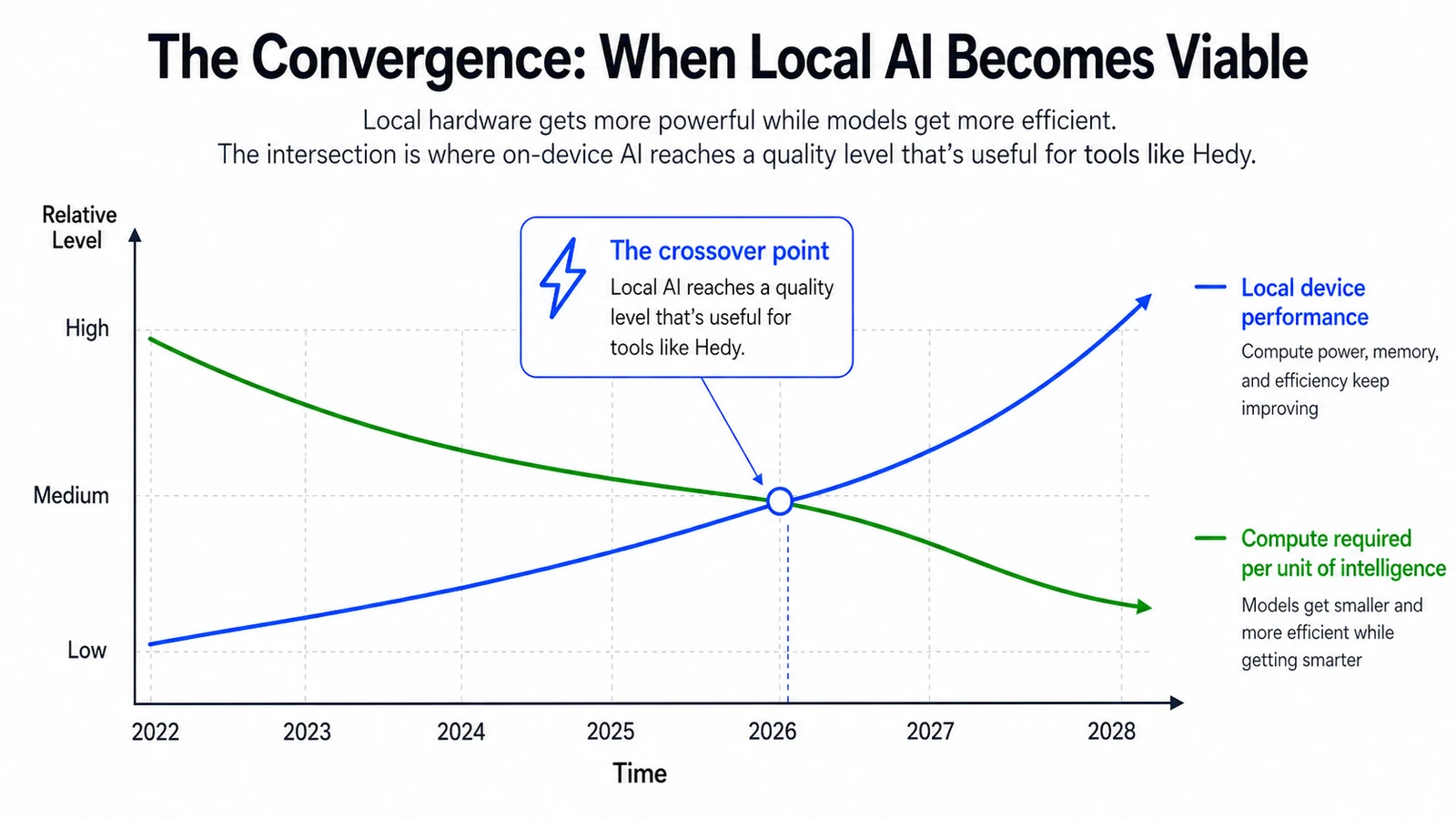
Illustrative — the curves show the broad direction, not specific measurements.
So with Hedy 3.2, you can turn on Local AI Processing and run our entire AI pipeline on your own device. Summaries, notes, chat replies, suggestions. All of it happens on your machine.
Why on-device AI matters
For most of the last few years, AI has been something a handful of large companies operate on your behalf. You send your data to their servers, their models process it, and the results come back. That model has obvious advantages, and it’s powered most of what we’ve been able to build. It also has a structural cost: the most useful AI requires the most personal data, and that data lives somewhere other than where it was generated.
Local AI flips that. Your conversation stays where it happened. The work happens on the same device that captured the audio. Nothing about the meeting reaches a server unless you enable Cloud Sync or explicitly share the session, and even then the AI processing stays local.
If you keep Cloud Sync off, nothing from your conversation reaches our servers unless you explicitly share that session.
Who benefits from a private, on-device meeting AI
Some Hedy users will turn this on and never think about it again. Others have been waiting for something like this for years. Here’s who we think benefits the most.
- Coaches and consultants whose client conversations carry strict confidentiality expectations. They’ve used Hedy for prep and internal calls. Now they can use it during client work without anything leaving the laptop.
- Lawyers who use Hedy for internal calls but never for client conversations. Attorney-client privilege has a specific shape, and “we promise to handle your data carefully” doesn’t fit that shape. Data that doesn’t move does.
- Patients heading into medical appointments who want a clear recap of what their doctor said, but don’t want their health discussion sitting on a third-party server. With Local AI, the recap can happen on the same phone that captured the conversation.
- Journalists working on sensitive stories who avoid cloud tools entirely. They can capture an interview, get a transcript, and chat with the meeting, all without anything reaching a server.
- Anyone outside the US who doesn’t want their conversations sitting on US servers. We added EU data residency earlier this year. Local AI takes that one step further: the data doesn’t sit on any company’s servers at all.
- Remote workers on bad airplane wifi or in rural areas without coverage. Hedy now works fully offline. Open the laptop on a flight, have a real conversation, get the summary before you land.
- The privacy-curious who don’t have a regulated profession or a specific threat model. They just preferred the idea that the thing listening to their meetings wasn’t sending the audio anywhere. They couldn’t have that before. Now they can.
What ties these people together is that Hedy was already useful for them in concept, but the data model didn’t fit their constraints. Local AI removes the constraint.
If you’re evaluating notetakers in general rather than reading about ours, we wrote a separate guide on using AI meeting notes privately that covers what leaves your device at each step and how to check any vendor’s claims.
The honest version
We want to be clear about what this is and isn’t, because we’d rather you go in with realistic expectations than feel let down later.
Local AI Processing is opt-in and off by default. Cloud AI is still faster, still produces better output, and runs on every platform Hedy supports. If you don’t have a specific reason to want on-device processing, the cloud option is the better experience right now.
A summary that feels instant in the cloud might take anywhere from 30 seconds to several minutes locally, depending on your hardware and which model you pick. Smaller models are good at short summaries but get tripped up on long or nuanced conversations. Larger models come close to cloud quality but need real hardware to run well. And we don’t silently fall back to the cloud when something fails locally. You opted into local for a reason, and a quiet retry against our servers would betray that intent. You’ll see an error instead.
Local AI is supported on Apple Silicon Macs, Windows PCs with a capable GPU, iPhone 15 Pro and later, and M-series or A17 Pro iPads. Android and Web are on the roadmap but not ready yet. The variation in Android hardware and the constraints of running models inside a browser make a consistent experience difficult to deliver today.
You pick the model that matches your hardware. We offer three quality tiers, ranging from compact models that fit on a phone, through mid-tier options that work well on most modern laptops, up to larger models that approach cloud quality on capable hardware. The model picker shows you what fits before you download.
Where this is heading
Local AI in Hedy 3.2 is a starting point, not a finished product. Models will keep getting better. Consumer hardware will keep getting more capable. The gap between local and cloud quality will keep closing. We’ll extend support to more platforms as the technology allows.
This is part of a broader shift that’s worth recognizing. For years, the biggest gains in AI have come from companies running ever-larger models on ever-larger server farms. A quieter shift is happening alongside that: open-weight models are getting smarter and smaller every few months. The hardware to run them is in most people’s pockets and on most people’s desks. The capability gap between cloud meeting AI and on-device meeting AI is closing quickly.
The bigger picture matters more than any single release. We believe the next few years of AI will be defined by a shift from a world where a handful of companies operate the AI on your behalf, to one where you can run your own pipeline, on your own device, with your own data, end to end. Whether you choose to do that or not, having the option is what gives the technology its proper shape. It keeps the power balanced.
Hedy is built to be at the front of that shift. Local AI is the first concrete step. There will be more.
To turn it on, update to Hedy 3.2 and look in Settings under Speech & AI. The toggle is labeled Local AI Processing. Pick a model that fits your hardware and you’re set.
For the engineering details — which models we picked, how they fit on Mac, Windows, and iPhone, and what local inference costs in latency — see our Local AI engineering deep-dive.
If you try it, we’d love to hear what you think.
About the author
Julian Pscheid is the founder and CEO of Hedy AI, a real-time AI meeting coach used by tens of thousands of professionals worldwide. He writes about how AI is changing the way people prepare for, capture, and understand important conversations.