Hedy Brings NVIDIA Nemotron 3 Diarization to iPhone and Mac
Hedy 3.12 brings NVIDIA's Nemotron 3 Diarization to iPhone and Apple Silicon Macs, running on your device to sort out who said what after a session.

NVIDIA today released Nemotron 3 Diarization, its most capable speaker diarization model yet, and Hedy supports it from day 0 in Hedy 3.12 on iPhone and Mac. It’s the most accurate diarization model we’ve seen, and it runs on your own device, so the record of who said what is easier to trust after a meeting ends.
Speaker labels are what turn a transcript into a conversation. When they drift, a quote lands on the wrong person and the summary repeats the mistake, which is the problem this model is built for.
What does Nemotron 3 Diarization do?
Diarization answers one question about a recording: who spoke when. It splits the audio into speakers and marks where each one is talking. Transcribing the words is a separate job, and so is knowing anyone’s name.
Nemotron 3 Diarization is NVIDIA’s newest model for that job. It builds on NVIDIA’s Streaming Sortformer research, which keeps each speaker’s label stable as a conversation goes on. From NVIDIA’s model documentation:
- It’s trained on conversational audio, including meetings, phone calls and podcasts.
- It handles overlapping speech, the moments when two people talk at once.
- It can track up to eight speakers in a recording.
- It labels speakers in the order they first speak, so the first voice becomes Speaker 1.
- It’s a compact model, around 100 million parameters, which is what makes running it on a phone realistic.
It also beats cloud services on two published benchmarks. According to NVIDIA’s launch post, the model ranks first on VoiceArena’s diarization leaderboard with a 14.72% diarization error rate (the share of speaking time labeled wrong), ahead of the next system at 19.3%. In Argmax’s published benchmark, it had the lowest error rate of six systems tested, three of them cloud diarization services, while running on a Mac.
NVIDIA also reports gains over its previous diarization model on every benchmark it tested, and the gap widens when more than four people are talking, which is where speaker labels have usually struggled.
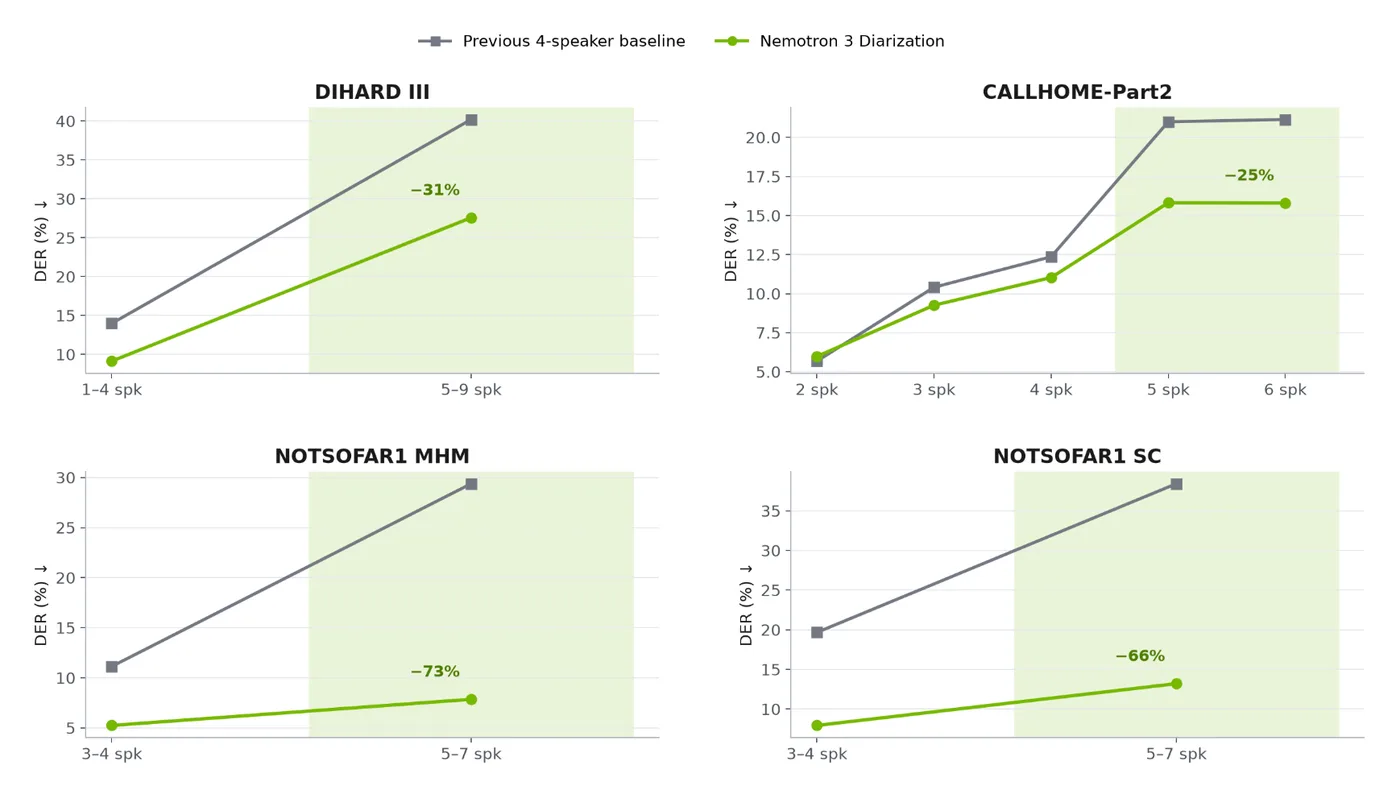
Chart: NVIDIA, from the Nemotron 3 Diarization launch post. Lower is better; shaded areas have more than four speakers. NVIDIA publishes the model on Hugging Face with its full evaluation results.
What does Nemotron 3 Diarization change in Hedy?
Hedy already labels speakers while you talk, using the Nemotron speech engine. Those live labels stay exactly as they are.
What’s new happens after you end a session. Live labels have to be decided in the moment, so Hedy now takes a second look once the conversation is over. It runs Nemotron 3 Diarization over the session and updates which speaker each part of the transcript belongs to.
The pass only touches speaker attribution. Every word in your transcript and every timestamp stays the same. Once it’s done, the speaker chips above your transcript work as they do now: tap one to give that speaker a name, or merge two chips that turn out to be the same person.
Does Nemotron 3 Diarization run on-device?
Hedy’s goal is meeting support that listens in real time and keeps your conversation private. That’s why speech recognition runs on your device by default, and why speaker labeling does too.
Nemotron 3 Diarization follows the same rule, and we’re excited that a model this capable is small enough to run on a phone. It runs on your iPhone or Mac through Apple’s Core ML, and no audio goes to a cloud service to work out who was speaking. To do its pass after a session, Hedy keeps the session audio in a temporary on-device cache and deletes it afterward. The speech recognition guide explains that cache and the setting that controls it.
The AI step that writes your summary and notes is a separate choice. You can keep that on your device too with Local AI Processing.
Which devices support Nemotron 3 Diarization?
Nemotron 3 Diarization runs on supported iPhones and Apple Silicon Macs with Hedy 3.12 or later. Hedy on Windows and Android keeps its current speaker labels.
Hedy 3.12 is rolling out over the next 24 hours, so look for the update in Hedy. Once you have it, open Settings → Speech & AI and install the speech model update Hedy offers there.
It applies to sessions captured with the Nemotron speech engine, the one that separates speakers in Hedy. If you use Whisper or a cloud speech provider today, switching to Nemotron in the same settings screen gets you speaker labels, live and after the session.
Frequently asked questions
What is Nemotron 3 Diarization?
It’s a speaker diarization model from NVIDIA. Diarization is the step that works out who spoke when in a recording. Nemotron 3 Diarization is built for conversations such as meetings and calls, handles people talking over each other, and can track up to eight speakers.
How accurate is Nemotron 3 Diarization?
According to NVIDIA, it ranks first on VoiceArena’s diarization leaderboard with a 14.72% diarization error rate, ahead of the next system at 19.3%. In Argmax’s published benchmark it had the lowest error rate of six systems tested, including three cloud diarization services. Diarization error rate is the share of speaking time assigned to the wrong speaker, missed, or wrongly marked as speech, so lower is better.
Will speaker labels during a live session change?
No. The live labels you see while a session is running keep working the way they do today. Nemotron 3 Diarization does its work after the session ends.
Does it run on my device?
Yes. The model runs on your iPhone or Mac through Apple’s Core ML. Your audio isn’t sent to a cloud service to work out who was speaking.
Which sessions does it apply to?
Sessions captured with the Nemotron speech engine. The model reads the session audio, so it needs that audio on your device: either audio recording is on, or the temporary audio cache for Nemotron is on. The cache is on by default and is deleted after processing.
Does it know people’s names?
No. The model tells voices apart and labels them Speaker 1, Speaker 2 and so on. Names still come from Hedy, which picks them up from introductions, your calendar invite and Topic context, and from any names you type yourself.
Which devices support it?
Supported iPhones and Apple Silicon Macs running Hedy 3.12 or later. Hedy on Windows and Android keeps its current speaker labels.
About the author
Julian Pscheid is the founder and CEO of Hedy AI, a real-time AI meeting coach used by tens of thousands of professionals worldwide. He writes about how AI is changing the way people prepare for, capture, and understand important conversations.