Apple Private Cloud Compute Comes to Hedy's AI Meeting Assistant
Hedy's AI meeting assistant can now run on Apple Private Cloud Compute, on iPhone and iPad with iOS 27, alongside Hedy's own cloud and on-device AI.

People arrive at Hedy with different rules about where their conversations are allowed to go. Some of those rules are personal preference. Others are set by an employer or a regulator, or by a professional obligation written long before AI meeting tools existed. So Hedy lets you choose where the AI runs, and your own rule decides.
As of Hedy 3.11 there is one more choice on iPhone and iPad. Under Settings → Speech & AI → AI Processing, next to Local AI, Cloud AI and Off, you will find Apple Private Cloud Compute.
What is Apple Private Cloud Compute?
Apple built Private Cloud Compute in 2024 to support Apple Intelligence. Some requests are too large for the model on your phone. Apple’s stated aim was to handle those without giving up the privacy properties people expect from something running on the device itself, so the requests go to Apple silicon servers instead of an ordinary cloud.
Apple states that data sent there is used only to fulfill your request, is not retained once the request is finished, and is not accessible to Apple. Apple also publishes the server software builds for inspection and includes them in the Apple Security Bounty program, so independent researchers can examine that claim directly. Apple describes the system in Apple Intelligence and privacy and in technical detail in Private Cloud Compute.
Can third-party apps use Private Cloud Compute in iOS 27?
Yes. With iOS 27, third-party apps can use Apple Private Cloud Compute, sending a request to Apple’s server model over the same Private Cloud Compute path Apple documents for that API. Hedy is one of those apps: from Hedy 3.11 you can choose Apple’s model for session summaries, detailed notes, chat and suggestions. For its first two years, Private Cloud Compute ran Apple’s own features and nothing else.
There are no API keys, and no account with Apple that Hedy holds for you. The request goes out under your Apple ID, and the daily usage limit that comes with it counts against your iCloud account rather than ours. The relationship is between you and Apple, and Hedy passes the request along.
How do I turn on Private Cloud Compute in Hedy?
Open Settings → Speech & AI → AI Processing and choose Apple Private Cloud Compute. Hedy shows a one-time explanation of what changes before it takes effect.
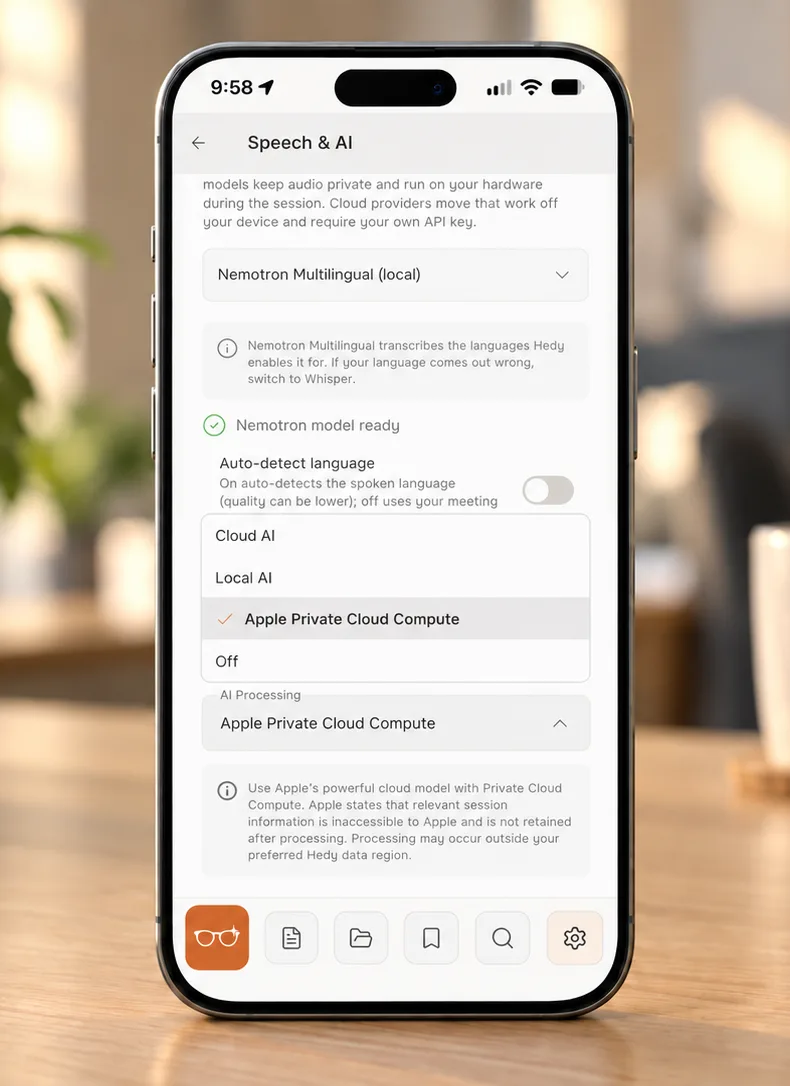
From then on the AI step runs on Apple’s model: session summaries, detailed notes, chat, and the suggestions that appear while you are talking. Speech recognition is a separate setting and does not move. If you transcribe on device with Nemotron or Whisper, that is still what happens, and your audio is still never sent anywhere for transcription.
How do Hedy’s AI processing options compare?
Hedy now has four ways to handle the AI step. The question worth asking is which one matches the rule you are working under.
| Option | Where the AI step runs | What you can show |
|---|---|---|
| Cloud AI | Hedy’s AI partners, inside the data region you selected. | Nothing stored, nothing used to train a model, processing kept in that region. |
| Local AI | On your own hardware, including offline. | There is no AI network request to make. |
| Apple Private Cloud Compute | Apple’s Private Cloud Compute. Apple does not commit to a region. | Apple’s published architecture. Apple publishes server builds for researchers to inspect. |
| Off | It does not run. | Nothing to guarantee. |
That table covers the AI step only. Cloud Sync, sharing, and your speech recognition provider are separate settings that keep following their own rules whichever option you pick here.
Apple states that those servers are built so the data cannot be retained or read, and it publishes the builds so researchers can inspect that claim. Hedy’s Cloud AI partners are bound not to store your session information or train on it, and the processing stays inside the data region you selected. The two answer different questions, and which one you want depends on what you have to be able to demonstrate to someone else.
On one point Cloud AI is the stronger option. It is the only one of the two that keeps processing in a region you choose. Apple does not commit to a region for Private Cloud Compute, which is why the explanation inside Hedy says plainly that processing may occur outside your Hedy data region. If EU residency is your requirement, Cloud AI with an EU region or Local AI will meet it and Apple Private Cloud Compute will not.
Hedy has handed custody to your own Apple account before. Session audio never reaches Hedy’s servers at all, and if you turn on Sync Recordings to iCloud, saved recordings go to your iCloud so you can play them on any Apple device you sign into. That setting and audio saving itself are both off until you turn them on. Private Cloud Compute does the same thing for the AI step, on your Apple account and against your own daily limit.
What do I need to use Private Cloud Compute in Hedy?
You need an iPhone or iPad running iOS 27, with Apple Intelligence turned on and a device eligible for it, and Hedy 3.11 or later. On a device that does not qualify, the option does not appear. Mac, Windows, Android and the web app continue with Local AI, Cloud AI and Off.
One behavior to know before you switch: there is no automatic fallback. If Private Cloud Compute is unreachable, has hit your daily limit, cannot fit the request, or declines it, Hedy tells you and stays where you put it. Moving your conversations to a different processor is not a decision we will make quietly on your behalf, so if you need the summary right now, switch to Cloud AI or Local AI yourself.
Apple’s model also has a smaller context window than Cloud AI, so a very long session or a question asked across a whole Topic can be too large for it. Hedy says so when that happens rather than trimming your conversation to fit.
For the full comparison, including what each option changes about the rest of the app, see AI Processing: Cloud AI, Local AI or Off and our guide to Hedy’s privacy settings.
Frequently asked questions
What is Apple Private Cloud Compute?
Apple Private Cloud Compute handles AI requests on Apple silicon servers when they are too large for the model on your device. Apple built it in 2024 to support Apple Intelligence. Apple states that the data is used only to fulfill the request, is not retained afterward, and is not accessible to Apple, and it publishes the server builds so researchers can check that. In Hedy it handles summaries, notes, chat and suggestions, while speech recognition stays on the engine you selected.
Which third-party apps use Apple Private Cloud Compute?
iOS 27 opened Private Cloud Compute to third-party apps for the first time. Hedy is one of them. From Hedy 3.11 you can select it for summaries, detailed notes, chat and suggestions on an eligible iPhone or iPad running iOS 27 with Apple Intelligence turned on. You choose it under Settings, in Speech & AI.
Does Hedy send my conversations to Apple?
Only if you choose Apple Private Cloud Compute under Settings, in Speech & AI. When you do, the text of the session goes to Apple’s servers for the AI step, meaning summaries, notes, chat and suggestions. Speech recognition is separate and stays on whichever engine you picked. If you choose Local AI, Cloud AI or Off, nothing goes to Apple.
How is Apple Private Cloud Compute different from Hedy’s Cloud AI?
They answer different requirements. Apple states that Private Cloud Compute is stateless, that the data is not accessible to Apple, and that researchers can inspect the server builds. Hedy’s Cloud AI guarantee is that partners do not store session information or train on it, and that processing stays in the Hedy data region you selected. Cloud AI is the only one of the two that can keep processing in the EU, because Apple does not commit to a region for Private Cloud Compute.
What happens if Apple Private Cloud Compute is unavailable?
Hedy tells you and stays on your setting. There is no automatic fallback to another provider, because switching where your conversations are processed is your decision. If you need the result right away, choose Cloud AI or Local AI in Settings.
Which devices support it?
An iPhone or iPad running iOS 27, with Apple Intelligence turned on and a device eligible for it, using Hedy 3.11 or later. It is not available on Mac, Windows, Android or the web app, where Local AI, Cloud AI and Off remain the choices.
Is there a usage limit?
Yes. Apple sets a daily limit that counts against your iCloud account rather than against Hedy. Apple says you can get more headroom by upgrading iCloud+. If you reach the limit, Hedy tells you and stays on the setting, so you can wait for it to reset or choose another option in Settings.
Does it change how Hedy transcribes my conversation?
No. Apple Private Cloud Compute handles the AI step only. Your speech recognition engine keeps running exactly as it did before, on your device if that is what you selected.
About the author
Julian Pscheid is the founder and CEO of Hedy AI, a real-time AI meeting coach used by tens of thousands of professionals worldwide. He writes about how AI is changing the way people prepare for, capture, and understand important conversations.