Best AI Tools for Lawyers in 2026
Nine AI tools for lawyers compared by job: research, drafting, contracts, citations, eDiscovery, reception, practice management and client meetings, with pricing.

What are the best AI tools for lawyers?
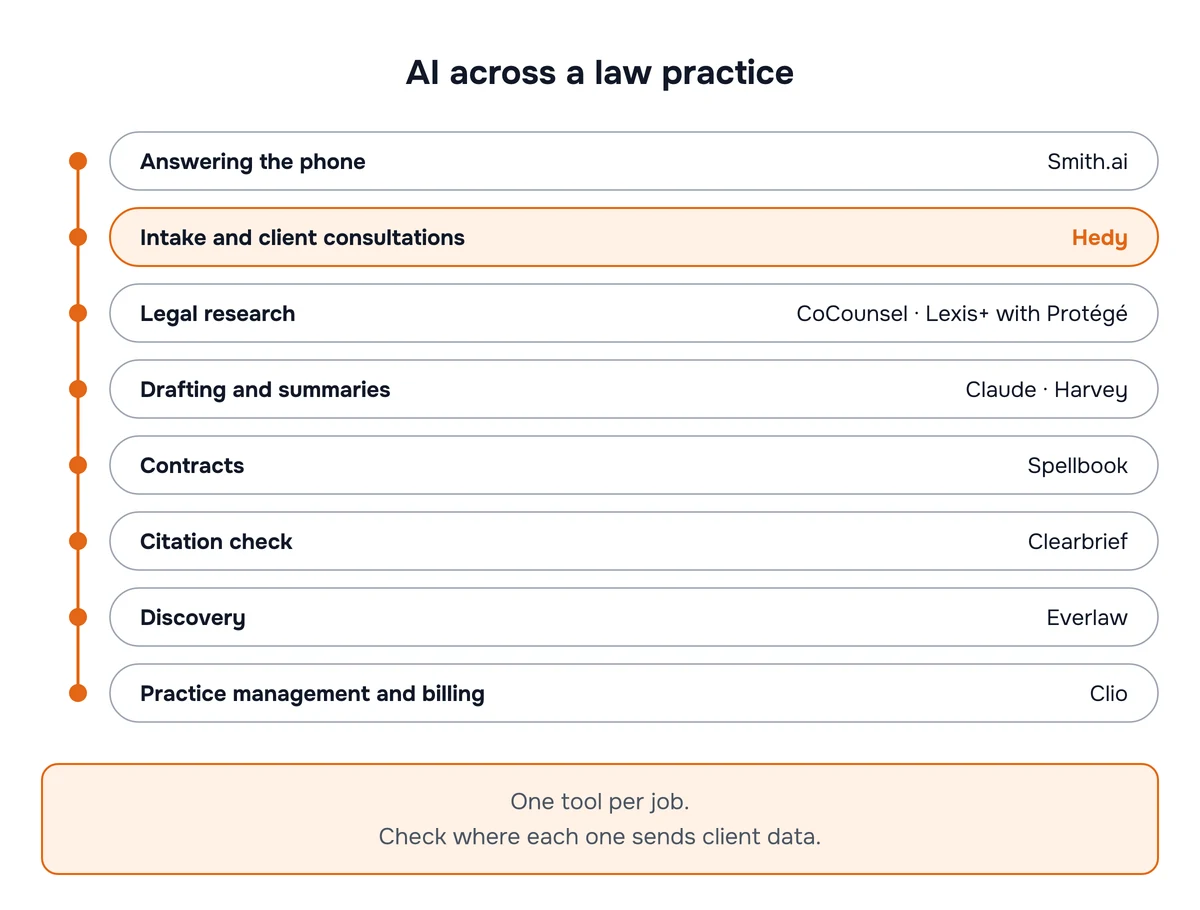
Most “best AI for lawyers” lists rank research and drafting tools and stop there. That covers the written half of the job. The other half happens out loud: intake calls, client consultations, strategy meetings, witness prep. Those conversations carry some of the most sensitive material a lawyer handles, and they’re where AI tools are newest and least examined. This guide covers both halves, one tool per job, with what each costs and where it sends your client’s data.
What should lawyers check before using any AI tool?
The ethics rules didn’t change for AI. The ABA applied the existing ones to generative AI in Formal Opinion 512 (July 2024), and the duties it names give you a usable checklist:
- Competence (Rule 1.1). Understand what the tool does and how it fails before you rely on it.
- Confidentiality (Rule 1.6). Know where client information goes, who can see it, how long it’s kept, and whether the vendor trains on it. The opinion says informed client consent is required before you put information relating to the representation into a self-learning tool, and that boilerplate in an engagement letter doesn’t count as informed consent.
- Communication (Rule 1.4). Even when consent isn’t required, a client may need to be told that AI is part of the work.
- Candor and supervision (Rules 3.3, 5.1, 5.3). You’re responsible for the output, and for how your staff use these tools.
- Fees (Rule 1.5). If you bill hourly, you bill the time actually spent, not the time the task used to take.
The risk that keeps showing up in court is fabricated citations. Damien Charlotin’s AI Hallucination Cases database had identified 2,231 decisions worldwide as of October 28, 2026 (tribunal rulings and self-represented litigants included), three years after Mata v. Avianca made the problem famous. Whatever tool you use, check every citation against the source.
Usage is already broad. In Clio’s 2026 Legal Trends Report, released October 26, 85% of legal professionals reported some level of AI adoption at their firms, up from 79% in 2025. A lot of that is general-purpose AI: in Clio’s 2025 survey, only 40% of legal professionals were using legal-specific AI tools, down from 58% the year before. So the plan you’re on and its data terms are the first thing to check.
Which legal AI tools are best for each job?
Comparison at a glance
| # | Tool | Best for | Processing and storage overview | Price |
|---|---|---|---|---|
| 1 | Hedy | Intake calls, client meetings & consultations | Speech recognition on your device by default; no bot joins; cloud AI analysis by default (processing partners don’t retain it or train on it) or on-device with Local AI; Cloud Sync storage optional | Free (5 hrs/mo); $12.99/mo or $99.99/yr |
| 2 | CoCounsel Legal | Legal research | Thomson Reuters’ cloud, under its enterprise terms | By package and term; reported several hundred dollars per user/mo |
| 3 | Harvey | Firm-wide AI platform | Harvey’s cloud, under firm contract | Negotiated |
| 4 | Spellbook | Contract drafting & review in Word | Spellbook’s cloud, from inside Word | Quote |
| 5 | Clearbrief | Citation & fact checking | Clearbrief’s cloud from inside Word; bring-your-own storage offered | Solo $300 per user/mo (annual); Enterprise custom |
| 6 | Clio | Practice management with AI | Clio’s cloud, alongside your matter data | Manage from $49 per user/mo; AI tiers by quote |
| 7 | Everlaw | eDiscovery & document review | Everlaw’s cloud, under case contract | Quote, by hosted data; AI features use credits |
| 8 | Smith.ai | Answering the phone & reception | Smith.ai’s call platform, synced to your CRM | Free for 25 calls/mo; Pro from $150/mo |
| 9 | Claude | General drafting & summaries | Anthropic’s cloud; commercial plans don’t train on your data by default | Team $20 per seat/mo (annual) |
Prices checked on October 28, 2026. Where a vendor sells through its sales team, “reported” figures come from the third-party source named in that tool’s section, not a vendor price list. The data column is an overview: retention, training, region, subprocessors and deletion terms need their own review. Confirm with the vendor before you budget.
1. Hedy: intake calls, client meetings and consultations
Client meetings are where privileged information gets said out loud. Legal platforms have only started to cover them: Harvey’s mobile app and Clio’s new phone system both added recording in 2026. General meeting tools fit worse still, because many work as a bot that joins your video call as a visible participant and sends the audio to a vendor’s servers. That’s a visible participant and one more outside party with the audio, which is the kind of access law-firm guidance keeps raising (more on that below).
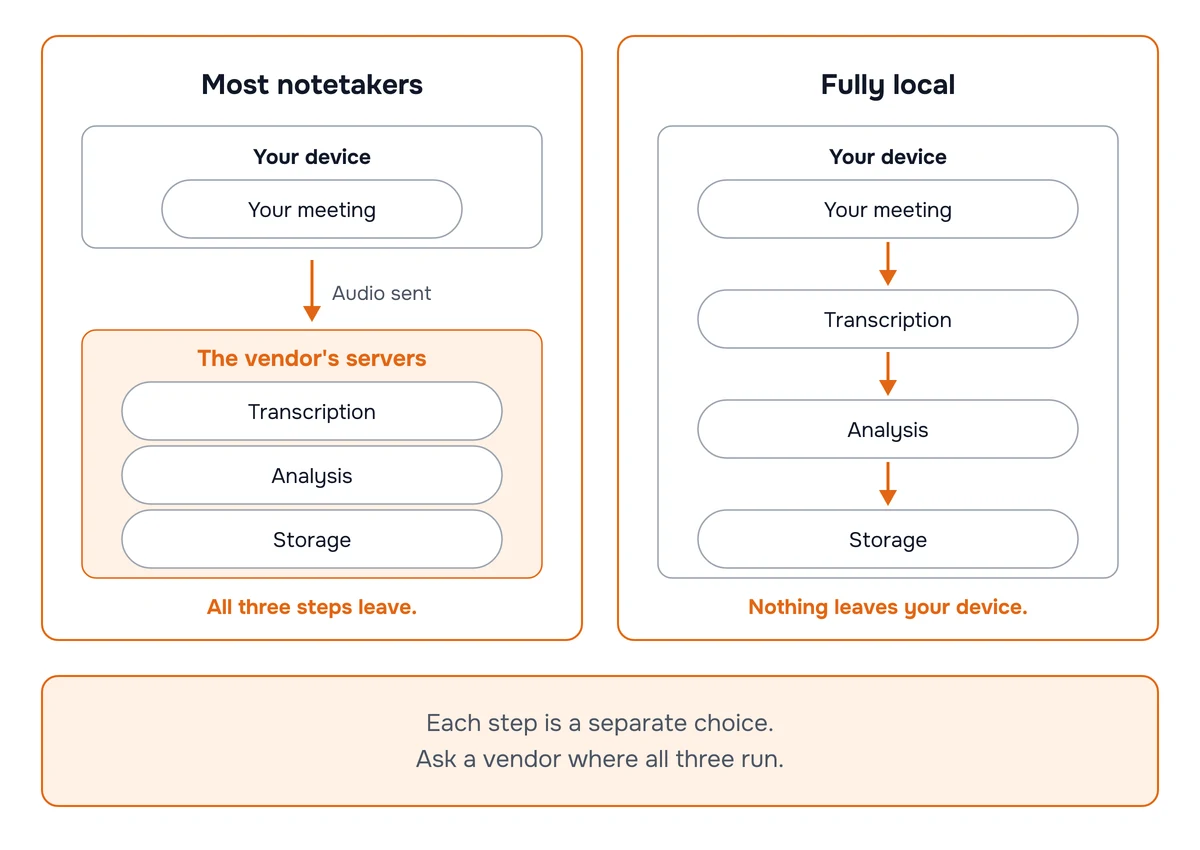
Hedy works differently. It runs on the lawyer’s own phone, tablet or computer and hears the conversation the way you do: in the room, or through your computer’s audio on Zoom, Teams or a phone call taken on your Mac. No bot joins. Speech recognition runs on the device by default on every platform, so with the default engines the audio never leaves it, and Hedy doesn’t keep an audio file unless you turn that on. AI analysis runs in the cloud by default: Hedy’s AI-processing partners handle the session information to produce your notes without retaining it or using it for model training. Storage is a separate choice: Cloud Sync, if you turn it on, keeps your sessions on Hedy’s servers. On an Apple Silicon Mac, a Windows PC with a capable GPU, or a recent iPhone or iPad, Local AI Processing moves the entire pipeline onto the device: transcript, summary, notes and live suggestions. To keep a new conversation entirely on the device that captured it, use a local speech engine and Local AI, and turn off Cloud Sync, iCloud audio sync and automatic recap emails, and don’t share the session. Account and diagnostic data still go to online services, but they carry no transcript or AI output. Our guide to keeping sensitive conversations on your device walks through each setting.
That includes intake. A first conversation with a prospective client, whether in person, on Zoom or on a phone call you take on your Mac, gets the same live help and notes as a meeting with an existing client.
Unlike a recorder, Hedy also helps while the meeting is still going. It suggests questions you haven’t asked yet: a date the client skipped over, a fact that matters for the limitations period, a document you’ll need. Afterward you get a summary, detailed notes under headings you choose, and your follow-ups as to-dos. Put each matter in its own Topic and Hedy carries what was said in earlier meetings into the next one, so you can ask “what did the client say about the second contract?” across every session on the matter. Our guide to using Hedy for legal consultations has the full setup.
Hedy completed an independent SOC 2 Type I examination of its security controls in April 2026, offers EU data residency for new accounts, and is rated 4.8 out of 5 across 1,000+ reviews. It doesn’t replace a court reporter, and it isn’t a document tool: it covers the spoken part of the work.
Price: free for 5 hours a month, no credit card. Pro is $12.99/month or $99.99/year. Hedy Team is the same price per seat for 2 to 200 people, with Topics the whole firm can share.
Best for: solo and small-firm lawyers who run their own consultations, and any lawyer who wants help and notes in client meetings without adding a bot to the call.
Hedy is our product.
2. CoCounsel Legal (or Lexis+ with Protégé): legal research
For research, the strongest AI is the one sitting on the legal database you already trust. General chatbots draw on the open web. The research incumbents ground answers in their own case law, statutes and secondary sources, with citators behind them.
CoCounsel Legal is Thomson Reuters’ AI built on Westlaw and Practical Law. It answers research questions with linked authority, reviews and summarizes documents, and drafts from the firm’s own materials. If your firm is on LexisNexis instead, Lexis+ with Protégé is the equivalent, with Shepard’s behind its answers and a library of pre-built workflows. Start with the one your firm already subscribes to.
Price: depends on the package and subscription term. CostBench reported $637 to $784 per attorney per month for one single-attorney CoCounsel Legal configuration in October 2026, lower on a three-year term. Lexis+ with Protégé is quote-based.
Best for: any lawyer whose research has to hold up in front of a judge.
3. Harvey: a firm-wide AI platform
Harvey is the best-known firm-wide legal AI platform. It covers research, drafting, document analysis, due diligence and multi-step agent workflows, and it can be tuned to a firm’s own precedents. Harvey says it has more than 3,500 customers in 85+ countries, including 80+ AmLaw 100 firms. Since August 2026 its mobile app can also record client meetings and depositions of up to two hours, saving a speaker-labelled transcript to Vault without keeping the audio.
Its main rival is Legora, which announced a $550 million Series E at an $8.8 billion valuation on October 21, 2026.
Price: negotiated, and third-party estimates disagree widely. Ask each vendor about minimum commitments, included capabilities, content access, usage charges and contract term.
Best for: mid-size and large firms that want one governed AI platform across practice groups.
4. Spellbook: contracts in Microsoft Word
Transactional lawyers live in Word, and Spellbook works inside it as an add-in. It drafts clauses, reviews a counterparty’s draft against your firm’s playbook, suggests redlines, and answers questions about the document in front of you, with contract-specific workflows a general chatbot doesn’t have.
Spellbook says more than 5,000 legal teams use it.
Price: quote-based, depending on seats and term.
Best for: corporate, commercial and in-house lawyers who draft and negotiate contracts every day.
5. Clearbrief: checking citations before you file
Given the sanctions record, a citation checker is worth having even if you use no other legal AI. Clearbrief is a Word add-in that reads your brief, links each citation and factual assertion to the source it relies on, and flags citations that don’t exist or don’t say what the brief claims.
Price: the Solo plan is $300 per user per month on an annual subscription. Enterprise pricing is custom, with multi-year discounts. Clearbrief also offers bring-your-own storage for firms that want documents in their own environment.
Best for: litigators, and anyone filing a document that includes AI-assisted research.
6. Clio: practice management with AI built in
For solo and small firms, the most useful AI is often the one already inside the case file. Clio is one of the most widely used practice management platforms for small firms, and its Manage AI assistant (formerly Clio Duo) works across your matters, documents, calendar and billing: summarizing a matter, drafting from its documents, and suggesting time entries. Clio Work, launched in October 2025 and sold standalone since April 2026, adds an AI workspace for research and drafting built on the vLex legal library that Clio acquired in a $1 billion deal. And Clio Phones, announced October 26, 2026, is a business phone system inside Clio that records, transcribes and summarizes calls and attaches them to the matter. At announcement, trials were available in select US states.
Price: Clio Manage starts at $49 per user per month. AI features and Clio Work are priced by plan or quote (Clio Work was reported at $199 per user per month at launch).
Best for: solo and small firms that want AI working on data they already keep in one place.
7. Everlaw: eDiscovery and document review
When a matter involves tens of thousands of documents, you need a review platform, not a chatbot. Everlaw is a cloud eDiscovery platform with generative AI for summarizing documents, answering questions across a review set, and drafting from the evidence. Relativity (with aiR) and DISCO are the main alternatives.
Price: quote-based. Everlaw’s pricing page ties cost to hosted data, includes unlimited user licenses, and bills some AI features in credits, so confirm both.
Best for: litigation teams and firms handling document-heavy disputes or investigations.
8. Smith.ai: answering the phone and reception
A missed call is often a missed client. Smith.ai covers the calls nobody at the firm can take: when you take an intake call yourself, that’s Hedy’s job. Smith.ai answers your firm’s phone with an AI receptionist (human receptionist plans are available too): it screens callers, runs your intake questions, books consultations and logs everything into Clio, MyCase, Lawmatics and other legal CRMs. Its published plans are priced by call volume.
Price: the AI Receptionist is free for 25 calls a month ($3 per extra call). Paid plans start at $150 a month for 75 calls, with higher-volume and human receptionist plans costing more.
Best for: solo and small firms where the lawyer can’t pick up every call.
9. Claude: general drafting, summaries and analysis
For everything else (a first draft of a client letter, a summary of a long deposition transcript, a plain-English explanation for a client) a general-purpose assistant is the most flexible tool on this list. Claude is a strong choice for legal work because of its long-document handling and its legal tooling: in May 2026 Anthropic launched Claude for Legal, with connectors to legal platforms including Thomson Reuters and Harvey, plus practice-area plugins.
Our advice is to use it on a commercial plan rather than a personal account. Anthropic does not train on inputs or outputs from its commercial products by default. Check the feedback setting too: feedback you choose to submit can include the conversation and may be used for training, and Team and Enterprise owners can turn feedback off. Terms matter in court as well. In United States v. Heppner (S.D.N.Y., February 2026), the court denied privilege and work-product protection to a defendant’s own exchanges with the consumer version of Claude, citing several grounds, including that no lawyer directed the use and the platform’s terms, as Mayer Brown summarizes. The decision didn’t establish that consumer AI always waives privilege, or that a commercial plan always preserves it. ChatGPT, Microsoft Copilot and Gemini are capable alternatives on their business plans, and the major productivity suites now offer meeting transcription or summaries too, depending on product, platform and plan.
Price: Team plan $20 per seat per month billed annually ($25 monthly). Enterprise from $20 per seat per month plus usage, 20-seat minimum.
Best for: everyday drafting and summarizing on material you’ve cleared for a commercial AI tool.
Are AI notetakers safe for attorney-client meetings?
They can be, but the tool and the setup matter more here than anywhere else on this list. Four things to know:
Consent comes first. The New York City Bar’s Formal Opinion 2025-6 (December 2025) says clients must be notified, and their consent obtained, before a lawyer uses AI to record and summarize their conversations. Secret recording runs into Rule 8.4’s ban on deceptive conduct. A follow-up, Formal Opinion 2026-2 (August 2026), covers prospective clients, opposing counsel and witnesses, and recommends getting their permission and, absent a good reason, not recording at all. State recording laws apply on top: several states, including California, Florida, Illinois, Pennsylvania and Washington, require everyone’s consent for some private conversations, and the rules can differ between phone calls and in-person meetings. Check the law where every participant is. Our recording laws and consent guide and consent scripts cover how to ask.
Every outside party is a privilege question. The authorities discussed here don’t establish that using an AI meeting assistant automatically waives privilege. The outcome depends on the communications, the applicable law, and the tool’s terms and operation, and the cases so far turn on who could access the material and on what terms. Mayer Brown advises organizations to assess whether third-party notetakers create an unacceptable risk of waiver in privileged meetings, and to require extra approval or prohibit them for legal advice. A meeting bot that records audio to a vendor’s servers, keeps it, and uses it to improve its models adds exactly the kind of access that weakens a confidentiality argument. In In re Otter.AI Privacy Litigation (N.D. Cal.), filed in August 2025, plaintiffs allege a popular notetaker captured meetings without participants’ permission and used the conversations commercially, including for model training. In August 2026 the court let wiretap and biometric-privacy claims proceed while dismissing others. Those are pleading-stage rulings, not findings of liability, and it’s a privacy case, not a privilege ruling.
The record cuts both ways. The NYC Bar opinion points out that a preserved recording can support an advice-of-counsel defense, and can also hand an opponent evidence. Decide what you keep. A transcript and notes you control are a different exposure from a stored audio file on a vendor’s server.
You still review it. The opinion is direct that AI transcripts and summaries can be wrong and that the lawyer has to check them before relying on them.
Bot-free capture keeps a visible participant out of the call, and on-device transcription keeps the audio away from a transcription provider. Neither alone establishes that a deployment preserves privilege: you still have to assess the whole data path, vendor terms, access, retention and the applicable law. Hedy separates three decisions: where speech is transcribed, where AI analysis runs, and where sessions are stored. By default, speech recognition runs on the device and Hedy’s cloud AI sends session information to processing partners that don’t retain it or train on it. For a fully on-device workflow, use a local speech engine and Local AI, turn off Cloud Sync, iCloud audio sync and automatic recap emails, and don’t share the session. Those settings reduce outside processing and storage. They don’t replace consent, review, confidentiality or record-keeping obligations, and your bar’s guidance is the authority on whether a setup meets them.
How should a law firm choose legal AI tools?
Picking AI for a law firm starts with firm size. Then fill the gaps one job at a time.
Solo and small firms: practice management AI (Clio or MyCase) plus a commercial general assistant (Claude or ChatGPT on a business plan) covers a lot of the written work for a modest monthly cost per lawyer. Add a meeting tool for consultations and an intake service if calls are going to voicemail. Research AI comes from whichever database you already pay for.
Mid-size and large firms: Harvey or Legora as the governed platform, a research incumbent alongside it, and specialists where a practice group needs them: Spellbook for transactional teams, Everlaw or Relativity for litigation, Clearbrief before anything is filed.
Whatever the size: read each vendor’s data terms for training, retention and subprocessors before client data goes in. Get the informed consent Opinion 512 describes where a tool learns from inputs, tell clients when you’ll record or transcribe a conversation, and keep a human check on every citation and every summary.
Frequently asked questions
What is the best AI tool for lawyers?
It depends on the job. For legal research, the AI built into the database you already pay for (CoCounsel on Westlaw, or Lexis+ with Protégé) is usually the best start. For one platform across research, drafting and review, larger firms look at Harvey or Legora. For contracts in Word, Spellbook. For checking citations in a brief, Clearbrief. For intake calls, client meetings and consultations, Hedy. Solo and small firms often get the most from the AI inside their practice management software, such as Clio.
Can lawyers use ChatGPT or Claude for client work?
Yes, with care. ABA Formal Opinion 512 does not ban general-purpose AI, but it requires lawyers to understand how a tool handles client information and to get informed consent before putting client information into a tool that learns from inputs. Our advice is a business or enterprise plan that does not train on your data rather than a personal account, plus a check of every citation it produces. In United States v. Heppner (S.D.N.Y. 2026), a court denied privilege and work-product protection to a defendant’s own chatbot exchanges, citing several grounds, including that no lawyer directed them and the platform’s terms. The case did not decide that consumer AI always waives privilege or that a commercial plan always preserves it.
Do lawyers need client consent to use AI?
Sometimes. ABA Formal Opinion 512 says informed consent is required before inputting information relating to the representation into a self-learning generative AI tool, and that boilerplate in an engagement letter is not enough. Recording or transcribing a client conversation is a separate question: the New York City Bar’s Formal Opinion 2025-6 says clients must be told and must consent before a lawyer uses AI to record and summarize their conversations.
Do AI notetakers waive attorney-client privilege?
Using an AI notetaker does not produce one automatic privilege outcome. Lawyers should assess who can access the content, the vendor’s contractual rights, retention and training practices, the purpose of the processing, and the applicable law. Firms such as Mayer Brown advise assessing whether a third-party notetaker creates an unacceptable risk of waiver in privileged meetings. Bot-free capture and on-device processing can reduce outside disclosure, but they are not legal guarantees.
How much do AI tools for lawyers cost?
Many legal-specific platforms, including Harvey, Legora and CoCounsel, price by quote, and third-party reports put Westlaw with CoCounsel at several hundred dollars per user per month. Others publish prices: Clearbrief’s Solo plan is $300 per user per month, Smith.ai’s AI receptionist starts free for 25 calls a month, and Claude’s Team plan is $20 per seat per month billed annually. Hedy is free for 5 hours a month, and Pro is $12.99/month or $99.99/year.
Are there free AI tools for lawyers?
A few, with limits. Hedy is free for 5 hours of sessions a month, and Smith.ai’s AI receptionist is free for 25 calls a month. Claude and ChatGPT have free personal tiers, but for client work our advice is a paid business plan that doesn’t train on your data. Most legal-specific platforms, such as CoCounsel, Harvey, Spellbook and Clearbrief, have no free plan, though some offer trials.
What is a major risk of using AI for legal research and court filings?
Fabricated citations. Damien Charlotin’s AI Hallucination Cases database listed 2,231 decisions worldwide involving hallucinated content as of October 28, 2026, including tribunal decisions and cases with self-represented litigants, so it is not a count of sanctioned lawyers. Every citation an AI tool produces has to be checked against the source before it goes into a filing.
What AI should a solo lawyer start with?
Start with the work that eats the most unbilled time. For many solos that is intake calls and client meetings, followed by research and drafting. Clio’s 2026 report on solo and small firms found 71% of solo practitioners already use AI for legal work. A practice management tool with AI built in, a commercial general-purpose assistant, and a meeting tool you can keep on your own device cover most of the day for a small monthly cost.
This article is general information, not legal or ethics advice. Rules vary by jurisdiction, so check your state bar’s guidance.
About the author
Julian Pscheid is the founder and CEO of Hedy AI, a real-time AI meeting coach used by tens of thousands of professionals worldwide. He writes about how AI is changing the way people prepare for, capture, and understand important conversations.