Best Local AI Tools for Productivity in 2026
Compare seven local AI tools for productivity in 2026: on-device meeting AI, dictation, desktop chat, notes, and document Q&A, with clear cloud boundaries.

What counts as local AI?
Local AI means the model runs on your hardware: your laptop, your phone, your server. Your data is processed where it already lives instead of being uploaded to a vendor’s cloud.
In practice it’s a spectrum, and pretending otherwise is how tools mislead you. There are three honest positions:
- Fully local. The model runs on your device and the tool works with the network off. Jan, Ollama, PocketPal AI, and VoiceInk’s default mode live here.
- Local by default, cloud optional. The private path is the default; you can plug in a cloud provider if you choose to. VoiceInk’s optional cloud transcription works this way.
- Hybrid with local guarantees. Part of the pipeline is local by design, part uses the cloud, and the tool is explicit about which is which. Hedy is in this group: speech recognition runs on-device by default on every platform, and machines that can run powerful local models can move the entire pipeline on-device.
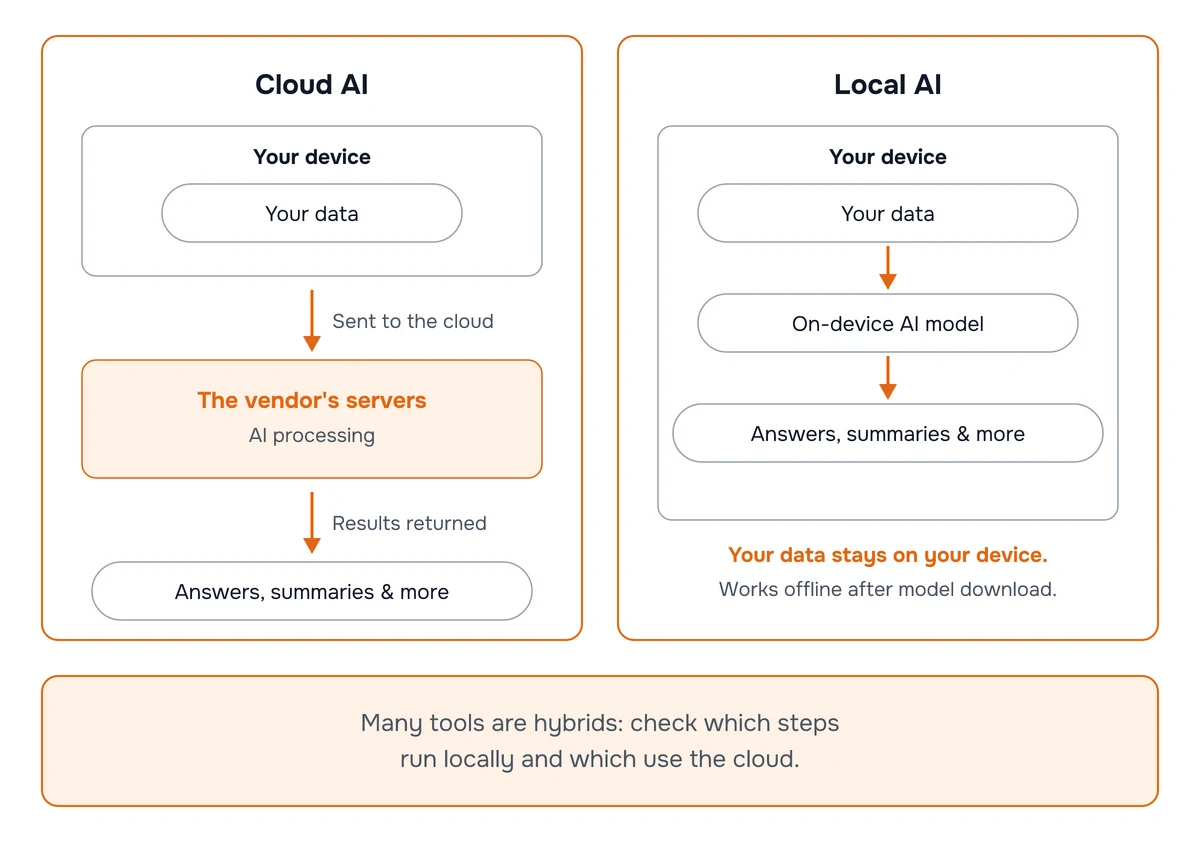
Using the cloud doesn’t disqualify a tool from this list. Being vague about it does. Every entry below states which steps run on your machine.
Why is local AI having a moment?
Two curves crossed. Devices keep getting more powerful, and the models keep getting smaller and smarter at the same time. Somewhere in the last year, models that fit on a laptop or a recent phone became strong enough to do real work: transcribe a conversation, summarize a document, draft a reply. We watched that crossover happen firsthand while building Hedy’s local pipeline, and wrote up the details in our local AI engineering deep-dive.
Concern about where AI data goes climbed over the same period. Pew Research found in June 2026 that 71% of U.S. adults expect increased AI use to make their personal information less secure; only 3% expect the opposite. People don’t stop using AI over that worry, they keep feeding it sensitive material: Cyberhaven measured that 27.4% of the data employees entered into AI tools in Q2 2024 was sensitive, up from 10.7% a year earlier. The canonical cautionary tale is still Samsung’s 2023 incident, where an employee uploaded a recorded internal meeting to ChatGPT to generate minutes.
Here’s our bet, and this article is written from it: local AI is the direction, not a niche. The cloud will keep the frontier for a long time, and for most people it will stay the better default for hard reasoning. But the local floor rises every year, the hardware is already in your pocket and on your desk (Gartner projects AI PCs will be 55% of the market in 2026), and once a job can be done well on-device there’s no good argument for shipping that data anywhere. “Where does this run?” is becoming a standard question to ask of every AI tool, the way “is this encrypted?” became one for messaging. The tools below are for the jobs where the answer can already be “right here.”
How we chose these tools
Five rules shaped this list:
- One tool per job. A stack of specialists beats a pile of overlapping apps that each hold a copy of your data. We picked one local-first option for each productivity job: meetings, dictation, chat, running models, notes, documents, and mobile.
- Local has to be real. Every tool either runs fully on-device or documents precisely which steps do. Vague “privacy-first” marketing without architecture details didn’t qualify.
- Active in 2026. We verified every tool’s pricing, features, and project activity against vendor pages and repositories in July 2026.
- Hybrids allowed, but disclosed. Tools that use the cloud for some steps are included when the boundary is explicit and under the user’s control.
- Full disclosure: Hedy is our product. This is an owner-published selection, not an independent benchmark, and Hedy holds the meetings slot by design. Direct meeting-tool alternatives (Granola, Fireflies, Superwhisper’s meeting mode) aren’t ranked here because we’re not a neutral referee in that category; we’ve written separate, sourced comparisons like our Granola alternative and Fireflies alternative guides for readers weighing those tools.
Which local AI tool is best for each job?
Comparison at a glance
| # | Tool | Best for | How local | Platforms | Price |
|---|---|---|---|---|---|
| 1 | Hedy | Meetings & live conversations | On-device speech recognition by default; opt-in fully local pipeline on capable hardware | iOS, Android, Mac, Windows, web | Free (5 hrs/mo); $12.99/mo or $99.99/yr |
| 2 | VoiceInk | Dictation | Fully on-device by default; optional cloud providers | macOS (iOS app available) | $25 to $49 one-time |
| 3 | Jan | Desktop AI chat | Fully local by default; optional cloud APIs | Windows, Mac, Linux | Free |
| 4 | Ollama | Running models locally | Fully local; optional cloud tier | Mac, Windows, Linux | Free; Pro $20/mo |
| 5 | Obsidian | Notes & knowledge base | Local Markdown files; plugins can use local models | Mac, Windows, Linux, iOS, Android | Free; Sync from $4/mo |
| 6 | PrivateGPT | Private document Q&A | Self-hosted; you choose the inference server | Self-hosted (Mac, Linux, Windows) | Free |
| 7 | PocketPal AI | AI chat on your phone | Fully on-device after model download | iOS, Android | Free |
Sources: Hedy pricing, VoiceInk pricing, Jan docs, Ollama pricing, Obsidian pricing, PrivateGPT repository, PocketPal AI. Prices verified against vendor pages in July 2026 and change often; re-check before you buy.
1. Hedy: meetings and live conversations
Meetings are where the most sensitive work data gets spoken out loud: client names, deal terms, health details, strategy. They’re also a workflow where popular AI tooling tends to be least private, because many meeting assistants work as a bot that joins your call and sends the audio to a server.
Hedy takes the opposite approach. Speech recognition runs on-device by default on every platform (Whisper everywhere, plus the Nemotron engine with on-device speaker labels), so with the default engines your audio never leaves your device, and no bot joins your calls. On top of the transcript, Hedy works as a real-time meeting coach: it pushes suggestions, answers, and questions worth asking while the conversation is still happening, then produces summaries, highlights, and to-dos afterward.
Hedy’s defaults are a deliberate split. Speech recognition runs locally on every device because it can, everywhere, at high quality. AI analysis runs in the cloud by default because we want Hedy to work on as many devices as possible with the best output we can deliver, and what is sent is never stored or used to train models. But the local ceiling is much higher than the default: any machine that can run powerful local models can move the entire meeting pipeline on-device with Local AI Processing. Transcripts, summaries, detailed notes, chat replies, and live suggestions all happen on the machine that captured the audio, offline if you want, on Apple Silicon Macs, Windows machines with capable GPUs, and recent iPhones and iPads. Turn Cloud Sync off and nothing from the conversation reaches our servers unless you explicitly share that session. Hedy 3.2 made that possible, which we wrote up in Local AI for meetings. You can also disable cloud AI analysis while keeping full transcription, choose EU data residency, and review every setting in our privacy settings guide.
The default mode is not fully local; the fully local mode is there when your hardware and your privacy requirements call for it, and either way you get a documented boundary you control. Hedy also completed an independent SOC 2 Type I examination of its security controls and an independent HIPAA assessment as a Business Associate in April 2026, and it’s rated 4.8 out of 5 across 1,000+ reviews by 30,000+ users.
Price: Free for 5 hours of sessions per month, no credit card required. Pro is $12.99/month or $99.99/year; a $299 lifetime license covers everything permanently.
Best for: anyone whose conversations are the most sensitive thing they’d otherwise feed to a cloud tool: consultants, sales reps, journalists, patients, and managers.
2. VoiceInk: dictation
Dictation is the quiet productivity win of local AI. Most people speak much faster than they type, and a good on-device model now transcribes accurately enough that there’s no reason to upload your voice for it.
VoiceInk is the dictation specialist for Mac. It transcribes your speech on-device using local Whisper and Parakeet models, works offline, and keeps your transcription history on your machine with configurable auto-deletion. A personal dictionary handles names and jargon, and per-app modes adjust formatting for email, chat, or code. It’s open source, so the privacy claims can be checked rather than taken on faith; the project has 5,500+ GitHub stars and the developer reports over 200,000 downloads. Optional cloud enhancement and cloud transcription providers exist, but they’re opt-in and labeled as such.
Why VoiceInk over the better-known Superwhisper or MacWhisper? Specialization. Both of those have expanded into meeting recording (Superwhisper, MacWhisper), which puts them in a different category (and a different privacy conversation) than pure dictation. VoiceInk’s Mac app sticks to one job: it types what you say. Its separate iOS app lists meeting and lecture transcription among its use cases, but there’s no call capture, speaker labeling, or summarizing; dictation is the product. For live conversations with other people, that’s Hedy’s job, and the two run side by side.
Price: one-time purchase from $25 (one Mac) to $49 (three Macs), lifetime updates included. A separate iOS app is currently free.
Best for: writers, developers, and anyone who answers fifty emails a day and doesn’t want a subscription or a cloud dependency for the privilege.
3. Jan: desktop AI chat
If ChatGPT is your default thinking tool but you’d rather not send every half-formed idea to a server, Jan is the local replacement with the least friction. Download the app, pick an open model (Llama, Qwen, Gemma, and dozens more in GGUF format), and chat. There’s no account to create, and once the model is downloaded it works with Wi-Fi off.
Jan is open source, with 43,000+ GitHub stars and 5.9 million reported downloads. Two design choices make it more than a toy. First, it exposes an OpenAI-compatible API on localhost, so other apps on this list (and your own scripts) can use your local model as a drop-in backend. Second, it’s upfront about hybrid use: you can add API keys for cloud providers when you want frontier-model quality, and Jan is explicit that those chats leave your machine under that provider’s terms.
Price: free.
Best for: everyday drafting and brainstorming where “good enough locally” beats “excellent but uploaded.”
4. Ollama: running models locally
Ollama is the plumbing of the local AI movement. It’s a command-line tool and background service that downloads and runs open models with one command (ollama run llama3), then serves them through a local REST API that a large ecosystem of apps builds on. If you use several local AI tools, there’s a decent chance they can all share one Ollama backend instead of each bundling their own model runtime.
It’s open source with 176,000+ GitHub stars, and the company reported serving 8.9 million developers in July 2026. Everything local is free and unlimited; paid cloud plans (from $20/month) exist for running larger models on Ollama’s hardware, kept separate from the local path.
Price: free for unlimited local use; optional cloud plans from $20/month.
Best for: power users and anyone who wants one shared, scriptable model backend behind their other tools.
5. Obsidian: notes and personal knowledge
Your notes are a map of everything you’re working on, which makes a cloud-only notes tool one of the more concentrated privacy bets people make without thinking about it. Obsidian avoids the bet entirely: notes are plain Markdown files in a folder on your device. The app works offline, the files outlive the company, and nothing syncs unless you set up syncing (the optional Sync service, from $4/month billed annually, is end-to-end encrypted).
The AI layer comes from community plugins, and it can stay local. Smart Connections builds embeddings of your vault on-device for related-note search, and Copilot for Obsidian adds chat over your notes with support for local backends like Ollama, which is where a shared local stack starts paying off. With a local model behind it, “chat with my notes” involves no third party at all. Both plugins also support cloud providers, so read their settings with the same care as any hybrid.
Price: free for personal and commercial use; optional Sync from $4/month billed annually.
Best for: anyone building a long-lived personal knowledge base who wants AI search over it without uploading their thinking.
6. PrivateGPT: private document Q&A
“Chat with your documents” was the first killer app of private AI, and PrivateGPT is its open-source standard-bearer: 57,000+ GitHub stars and a full relaunch in June 2026, when Zylon shipped v1.0 and merged two years of private enterprise development back into the public repository.
PrivateGPT 1.0 is an application backend: it handles document ingestion, retrieval with citations, chat, and tool orchestration. As Zylon puts it in the 1.0 announcement, “PrivateGPT 1.0 does not run models itself”: you point it at the inference server of your choice. That’s what makes a fully self-hosted setup possible here: pair it with Ollama or llama.cpp on the same machine and document processing stays inside infrastructure you control. It’s also the entry on this list most suited to a small team standing up a shared private assistant on their own server.
Fair warning on fit: this is the most technical tool here. There’s no one-click installer, and the polished consumer alternatives in this category have mostly drifted into meeting transcription features, which is why they didn’t make this list.
Price: free; you supply the hardware.
Best for: technical users and small teams who want document Q&A running entirely on infrastructure they control.
7. PocketPal AI: local AI on your phone
The phone is where local AI got real for non-technical people, and PocketPal AI is the cleanest way to try it. It’s a free, open-source app for iOS and Android that downloads small open models (Llama, Qwen, Gemma, Phi) and runs them entirely on the device. No account, no telemetry, and it keeps answering in airplane mode.
The project reports 1.2 million downloads, and its community has submitted over 7,000 on-device benchmark results across 100+ phone models, which doubles as a practical answer to “will this run on my phone?” (Rule of thumb: recent iPhones and mid-range-or-better Android phones handle the small models comfortably.) It won’t match a frontier model on hard reasoning, but for quick drafts and translations it’s a working demonstration that useful AI now fits in a pocket with no server involved. That’s the same bet Apple made by putting on-device processing at the center of Apple Intelligence.
Price: free.
Best for: trying local AI with zero setup, and as the offline pocket assistant for quick tasks.
How do you build a local AI stack out of these?
Start with the job that carries your most sensitive data. For many professionals that’s meetings and conversations, the slot Hedy covers; for others it’s documents or notes. Move that one workflow to a local-first tool and you’ve captured most of the privacy benefit in a single step.
Then add specialists one at a time: one dictation tool, one chat tool, one notes tool. Resist overlap. Two tools doing the same job means two copies of the same sensitive data in two places, which is the opposite of the point. The stack that emerges from this list shares infrastructure nicely: Ollama serves models, Jan and the Obsidian plugins and PrivateGPT can all sit on top of it, VoiceInk types what you say, and Hedy covers everything spoken with other people.
Finally, verify instead of trusting. Turn off Wi-Fi and see what keeps working. Read the privacy page and look for step-level specifics (audio, transcription, analysis, storage) rather than adjectives. Every tool above passes that reading test; that’s why they’re here. For the meeting slot specifically, our guide to using AI meeting notes privately works through that check in detail: what leaves at each step, and why an offline test tells you less than you’d think.
Frequently asked questions
What is the best local AI tool for productivity?
It depends on the job. For meetings and live conversations, Hedy runs speech recognition on-device on every platform, and machines that can run powerful local models can move its entire AI pipeline on-device too. For dictation, VoiceInk transcribes entirely on your Mac. For desktop AI chat, Jan runs open models locally with no account. For notes, Obsidian keeps everything in local files. Most people end up combining two or three tools that each cover one job.
What does “local AI” mean?
It’s a spectrum, not a yes/no label. Fully local tools like Jan, Ollama, and PocketPal run the model on your hardware and work offline. Hybrid tools run part of the pipeline locally: Hedy, for example, runs speech recognition on-device by default and offers an opt-in Local AI Processing mode that keeps the analysis step on your device as well. What matters is knowing which steps stay on your machine and which don’t, and whether you can control that.
Are local AI tools as good as cloud AI?
For many productivity jobs, yes. On-device speech recognition is now excellent, local embeddings handle note search well, and small open models cover summaries and drafting. For frontier-level reasoning, cloud models still lead. That’s why several tools on this list are honest hybrids: local where privacy matters most (your audio, your files), cloud where quality matters most, with a switch to go fully local when you need it.
Is Hedy fully local?
Hedy’s defaults are a deliberate split. Speech recognition runs on-device on every platform (Whisper everywhere, plus Nemotron with on-device speaker labels), so with the default engines your audio never leaves your device and no bot joins your calls. AI analysis runs in the cloud by default so Hedy works on as many devices as possible with high-quality output. But any machine that can run powerful local models (Apple Silicon Macs, Windows machines with capable GPUs, recent iPhones and iPads) can move the entire pipeline on-device with the opt-in Local AI Processing mode, which also works offline. Turn Cloud Sync off and nothing from the conversation reaches our servers unless you explicitly share that session.
What hardware do I need to run local AI tools?
Less than you’d think, though it varies by model and device. Dictation and speech recognition run well on recent phones and laptops. For local LLM chat, the rule of thumb is 8 GB of RAM for small models and 16 GB or more for mid-size ones; Apple Silicon Macs and newer AI PCs handle both well. Gartner projected that AI-capable PCs would make up 31% of the PC market in 2025, so the hardware side of this is quickly becoming the default.
Are local AI tools free?
Mostly. Jan, Ollama, PrivateGPT, and PocketPal AI are completely free. Obsidian is free for personal and commercial use, with optional Sync from $4/month billed annually. VoiceInk is a one-time purchase between $25 and $49 for Mac. Hedy has a free tier with 5 hours of sessions per month; Pro is $12.99/month or $99.99/year.
Which local AI tools work fully offline?
Jan, Ollama, and PocketPal AI keep working with no connection once their models are downloaded. VoiceInk transcribes offline with its local models, and Obsidian works offline by default. PrivateGPT runs offline when paired with a local inference server. Hedy works offline when Local AI Processing is enabled on a machine that can run local models, paired with an on-device speech engine.
Which of these tools run on Windows?
Hedy, Jan, Ollama, and Obsidian all have Windows apps, and PrivateGPT can self-host on Windows. VoiceInk is Mac-only (with a separate iOS app), and PocketPal AI is mobile-only. One Windows-specific note: Hedy’s Local AI Processing requires a Vulkan-capable GPU; on-device speech recognition works regardless.
Why does privacy matter for AI productivity tools?
Because work data is exactly what people feed these tools. Cyberhaven found that 27.4% of the data employees entered into AI tools in Q2 2024 was sensitive, about 2.6 times the share from a year earlier. Samsung’s much-cited 2023 incident included an employee uploading a recorded internal meeting to ChatGPT for minutes. Local processing removes that failure mode: what never leaves your device can’t end up in someone else’s logs.
About the author
Julian Pscheid is the founder and CEO of Hedy AI, a real-time AI meeting coach used by tens of thousands of professionals worldwide. He writes about how AI is changing the way people prepare for, capture, and understand important conversations.