How Private Is Your AI Notetaker?
AI notetakers turn your meeting into a record someone else holds. Find out what leaves at each step, how to check a tool's claims, and how to keep it all local.

The Associated Press ran a piece on July 9, 2026 about AI notetakers at work that catalogues the risks well (AP, July 2026): confidential personnel information, corporate strategy, trade secrets, remarks that read badly in a deposition later. Its advice is sensible too. Check whether a notetaker joined. Ask for consent before a sensitive meeting. Lean on company policy so no individual has to be the one objecting. Turn the tool off for the delicate part. Ask what the vendor retains, and whether it trains on any of it.
Every one of those manages the consequences of your meeting becoming a record someone else holds. None of them asks whether it has to. Justin Daniels, a corporate attorney at Baker Donelson, gave the piece its sharpest line: “I won’t start talking about anything substantive until it’s shut off, because I just don’t want to take the risk.” That is the right advice for the tools most people have, and it assumes the meeting has to leave your hardware.
On current devices, it doesn’t. A small number of products can run the entire pipeline on your own machine, and that isn’t widely known.
What leaves when you use a notetaker?
Three things, and they leak independently. Transcription turns your audio into text. Analysis reads that text and writes your summary and action items. Storage decides whether any of it persists somewhere you don’t control. Each one can stay on hardware you own or move to someone else’s, which makes eight possible combinations.
| Step | What it does | Can it run on-device? | What leaves if it doesn’t |
|---|---|---|---|
| Transcription | Turns audio into text, sometimes with speaker labels | Yes, on current hardware | The audio itself, plus an acoustic embedding per speaker in many systems |
| Analysis | Reads the transcript, writes summaries and action items | Yes, on capable hardware | The transcript, and whatever a model infers from it |
| Storage and sync | Keeps the archive | Yes, by staying off | A durable, searchable copy, plus metadata that can outlive deletion |
This is where most privacy claims hide. “Audio never leaves your device” sounds like a statement about the whole product. It only means transcription is local, and it’s compatible with sending the full verbatim transcript to a language model a second later. Hedy does exactly that by default, which is why “does the audio leave” is the wrong question to stop at. The transcript is the record. Once it’s off your machine, most of what you were worried about is off your machine.
Hybrid processing is common, Hedy’s default included. The problem is a vendor that won’t say which steps leave your device.
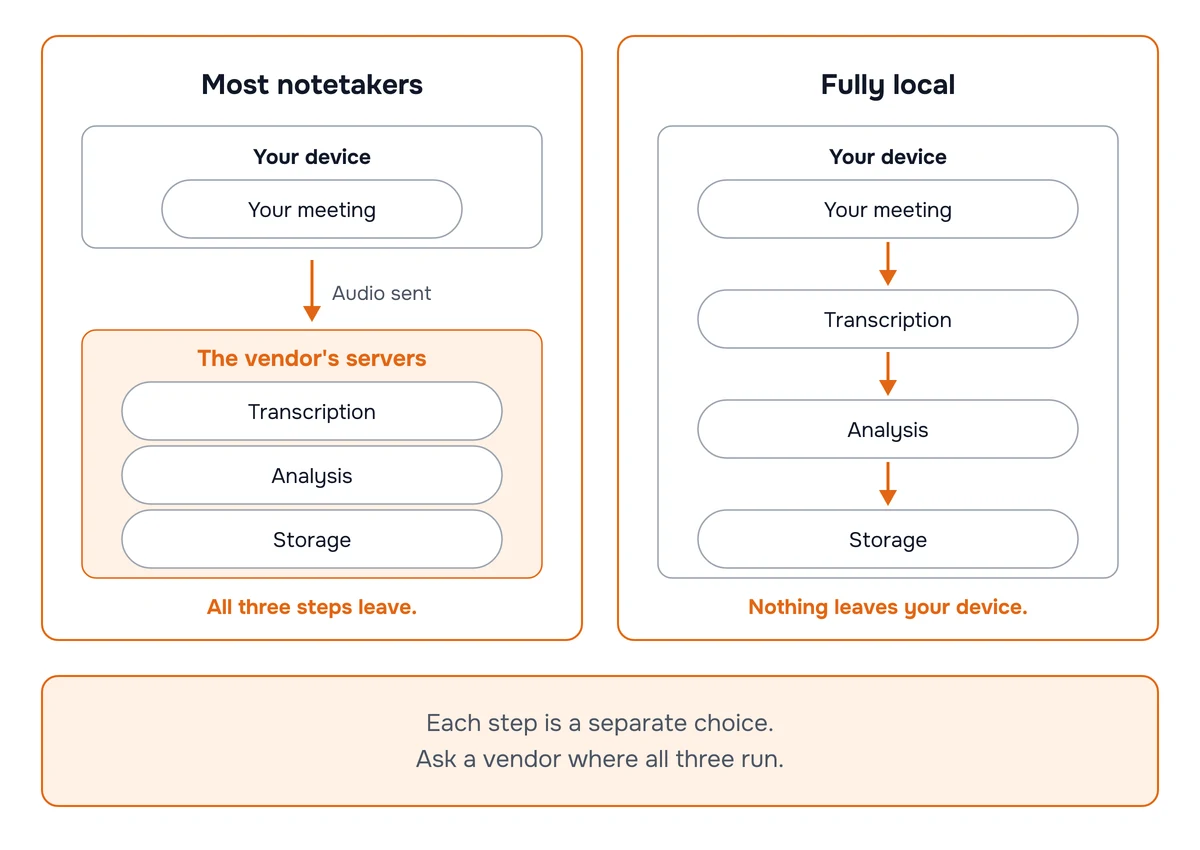
Can the whole pipeline run on your device?
Yes, on current hardware, and this is the part that has quietly changed. Fewer products do all three.
Transcription is the easier step
Whisper, the default engine, runs on every platform Hedy ships on. Nemotron runs on every native platform, not the web app. Nemotron is a streaming engine built on NVIDIA’s 600M-parameter speech model, and it adds the speaker labels that used to be the reason people reached for a cloud engine. It needs a one-time download of roughly 0.6 to 0.7 GB and runs on Apple Silicon Macs, iPhone XS and newer, iPads with a Neural Engine, Windows, and 64-bit Android. Accuracy still moves with accent, room noise, crosstalk, and specialist vocabulary, so test it on your own meetings rather than any published number.
Nemotron also works out who said what, on the device, and Hedy can now put real names on those speakers when someone is introduced or addressed by name. Since Hedy 3.12, supported iPhones and Apple Silicon Macs also re-check the speaker labels after a session ends with NVIDIA’s Nemotron 3 Diarization. NVIDIA reports it ranks first on the VoiceArena diarization leaderboard and had the lowest error of six systems in Argmax’s benchmark, three cloud services among them. That pass runs on the device as well, so labeling speakers doesn’t require sending audio to a server.
Analysis is where the tradeoff lives
Local AI Processing runs the summarizing and suggesting on your machine, and it wants real hardware: an Apple Silicon Mac, a Windows PC with a capable GPU, or a recent iPhone or iPad. Models run from about 1.2 GB for the mobile tier to over 20 GB. A mid-tier model around 9 billion parameters sits comfortably on a 16 GB Mac. The largest want roughly 25 GB or more of RAM.
Local AI Processing is off by default because cloud analysis is faster and currently produces better results. Hedy’s default is a deliberate split: speech recognition local everywhere so audio never leaves without you asking, analysis in the cloud so the product works well on hardware that can’t host a language model. A summary that feels instant in the cloud can take thirty seconds to several minutes locally. The engineering deep-dive has the full accounting.
Local AI Processing does not silently fall back to the cloud. If something fails locally you get an error, not a quiet retry against a server. Silent fallback is the worst property a privacy feature can have, because it fails in the exact direction you were trying to prevent and tells you nothing.
One more option sits between the default and fully local. On eligible iPhones and iPads running iOS 27, you can send the analysis to Apple Private Cloud Compute instead of Hedy’s partners. It runs under your Apple account and doesn’t fall back either. It is still off-device, though, and Apple doesn’t commit to a region, so it won’t satisfy an EU residency requirement. If EU residency is your constraint, stay on Cloud AI: accounts in Hedy’s EU data region have Cloud AI processed in the EU by Inceptron, under a contract that rules out storing or training on the content.
Storage is a toggle, not a feature
The step people forget is the archive, because it arrives disguised as convenience. Cloud Sync copies session data to Hedy’s servers so your other devices can see it. Leave it on and you get cross-device access with local processing. Turn it off and nothing from the conversation reaches our servers unless you explicitly share that session. Local processing and local storage are separate decisions, and a tool that only offers the first hasn’t closed the pipeline.
Sharing is the other way content leaves. A public share link puts the sections you choose on a web page anyone with the address can open, no account needed. It never includes audio, and you can set it to expire or revoke it, but it’s unlisted, not private: the address can be forwarded. For anything confidential, share by email invitation instead, so the recipient has to sign in.
How do you check a notetaker’s claims?
Observe behavior, then read documents. Neither alone is enough.
Try airplane mode. Disable networking and start a session. If a tool keeps transcribing and summarizing, a local path exists, which is worth knowing. Treat it as one signal rather than proof: a stall might mean the tool wants a login or a model download rather than the cloud, and a tool with a working offline path can still route everything through a server the moment you reconnect. It tells you a local mode exists. It doesn’t tell you what happens when you’re online.
Watch for the speaker-label question. If a tool shows speaker labels and claims nothing leaves your device, ask which on-device engine does the diarization. A vendor that can name it is telling you something real. A vendor that can’t may be labeling server-side.
Read the subprocessor list. The privacy policy is drafted to reassure. The subprocessor list exists for procurement and contractual notice, so it names the companies in the path. Hedy’s is published at trust.hedy.ai. Read any vendor’s list for which companies can receive meeting content and why; length alone tells you little.
Ask what survives deletion. Danielle Kays, a partner at Fisher Phillips, noted that meeting metadata can persist with a vendor after content is deleted, and that ingested content can in some cases be memorized or reproduced by a model. Deletion semantics vary by vendor, and “delete” often means “remove from the view you can see.”
If it genuinely matters, inspect the traffic. Offline tests and privacy pages answer different questions and neither watches the network. For a regulated deployment, packet or DNS inspection is the check that actually observes what a tool sends.
What should you ask before installing one?
Five questions. The answer to each should be specific.
- Where does each of the three steps run? Transcription, analysis, storage, named separately. Not “is it private.”
- Do you create speaker labels, and where? If server-side, ask what the embedding is, how long it’s kept, and what notice participants get.
- What’s the retention and destruction schedule? In writing, with a term. Illinois asks for exactly this, and per the lawyers quoted later, most companies deploying these tools don’t have it.
- Who are the subprocessors, and where? This is also the GDPR question if you have European participants, where recent developments around EU-US transfers made the legal basis less comfortable than it was.
- Does it fall back to the cloud on failure, and does it say so? Silent fallback turns a privacy setting into a decoration.
How do you run Hedy with nothing leaving?
Check one default, then change two settings.
Open Settings → Speech & AI. Confirm that Whisper or Nemotron is selected. Whisper is already the default, so most people find this done for them; you only need to touch it if someone switched to a cloud provider.
In the same screen, set AI Processing to Local AI and pick a model showing the “Great fit” label. Hedy checks available memory and flags each model as Great fit, Tight fit, or Won’t fit, so you’re not guessing. It’s per device, so your Mac and your iPhone each need their own.
Then turn Cloud Sync off. With it off, no meeting data goes to our servers unless you explicitly share a session.
If your hardware can’t run a local model, set AI Processing to Off (AI Processing: Cloud AI, Local AI or Off compares the options). Local transcription keeps working, so you get a private transcript without AI-generated notes. Our settings walkthrough covers the full matrix, and the security page documents each configuration.
Does a private notetaker still need consent?
Yes. A device-based tool is harder for other people to see than a bot.
AP noted that participants may use personal notetaking devices separate from the meeting platform, “in which case the other attendees wouldn’t necessarily know a discussion was being recorded and transcribed.” A bot renders itself in the attendee list. An app on someone’s phone renders nothing. That makes quiet recording easier, and it’s a fair criticism of the category we’re in. Thorin Klosowski, senior security and privacy analyst at the Electronic Frontier Foundation, gave the plain answer: “Asking everyone for consent before doing a sensitive meeting would be the most polite approach to take.”
Local processing decides where data goes. It has nothing to say about whether anyone agreed. Recording law, workplace policy, and professional duties all survive the architecture, and running a tool nobody can see raises the obligation to say so.
What does get easier is the conversation. Most resistance to being recorded isn’t about the notes, it’s about the archive: who else sees this, how long does it live, what happens when the vendor gets acquired. “It stays on my laptop and I’ll delete it after” is a different conversation from “it’s uploading to a service whose terms I haven’t read.” We wrote word-for-word consent scripts for the awkward version, and our recording laws and consent article covers the jurisdictional side.
Chris Pluymers, an associate attorney at The Dillon Law Group, also offered language for declining a notetaker: “I prefer we keep this meeting without AI recording or transcript tools and I’d be happy to take my own notes and share a recap if that’s helpful.” Amy Dufrane, chief executive of the HR certification body HRCI, suggested making it institutional rather than personal, citing company policy so no individual has to be the one objecting.
Why are transcripts riskier than recordings?
Klosowski made the sharpest observation in the AP piece: “Storing a bunch of video isn’t easy, it’s costly and hard to look through, but text is much easier to search and cheaper to store.”
Before AI notetakers, the practical protection on a recording was friction. A two-hour meeting is a two-hour object. Nobody scrubs it without a reason, and storage costs enough that recordings get deleted. That friction was doing real security work nobody had to budget for.
Transcripts remove it. Text is cheap enough to keep forever and searchable the moment it lands. One query across four years of archives surfaces every instance of a phrase, to anyone with access, including opposing counsel with a discovery order. A remark that would have died in an unwatched recording becomes a search result.
Not a clean upgrade in danger, though. Audio carries things text drops: tone, background conversation, and enough of your voice to clone it. Audio can also be transcribed later, so a recording is a transcript that hasn’t happened yet. The shift is from “someone might find this” to “someone can find this instantly,” and most people never priced in the difference.
What is a voiceprint, and who has yours?
Pluymers described the mechanism: to tell Speaker 1 from Speaker 2, many notetakers derive an acoustic signature for each voice. That process is called diarization, and it’s the thread most readers won’t have considered.
Where the law stands
In Illinois, voiceprints are biometric identifiers under the Biometric Information Privacy Act, which requires written notice, disclosure of purpose and retention term, an executed release before collection, and a documented destruction schedule (740 ILCS 14/15). Whether a diarization embedding counts as one is an emerging theory being tested in court, not settled law (Lewis Rice). Some end-to-end diarizers don’t even work that way, mapping audio to anonymous speaker indices without building a persistent template.
The litigation is real. AI meeting tools are an active target for BIPA class actions (Fisher Phillips), and Fireflies.ai is the defendant in a putative class action alleging it records, transcribes, and stores participants’ voices, including people who never signed up, without the required notice, consent, and retention safeguards (Jackson Lewis). Those are allegations. As of late August 2026, the consolidated case in the Northern District of Illinois was still at the motion-to-dismiss stage, with Fireflies filing its reply on August 26 (docket). Vendors are also writing voiceprints into their policies: Fathom’s privacy policy, updated August 16, 2026, describes optional voiceprint collection on iOS (Fathom).
What a stolen voiceprint can and can’t do
The scary version circulates, so it’s worth narrowing: a stolen diarization embedding is unlikely to work as a key to your bank account on its own. Banks that use voice verification enroll their own templates, and a vendor’s internal embedding isn’t built to be interchangeable with one. The real voice risk is more ordinary, which is enough recorded audio to clone someone convincingly (FTC). That’s an argument about the audio, not the embedding.
Why on-device diarization changes the exposure
On-device diarization has a useful precedent. In Barnett v. Apple, an Illinois appellate court affirmed dismissal of a BIPA class action over Face ID and Touch ID, holding Apple neither possessed nor collected users’ biometric data because it never left their own devices, was never sent to Apple’s servers, and the features were elective and deletable (Duane Morris, IAPP). That maps closely onto local diarization: derived on your device, never transmitted, optional, deletable. Hedy’s Nemotron engine works this way, and so does the Nemotron 3 Diarization re-check that follows a session.
It isn’t a safe harbor. Barnett turned on its facts, a different design or pleading could come out differently, and it says nothing about the obligations of whoever convened the meeting. This is risk reduction with a good precedent behind it, and none of it is legal advice.
Can a notetaker affect attorney-client privilege?
A federal court has held that AI-generated documents were not privileged.
What the court held
In United States v. Heppner, Judge Jed Rakoff of the Southern District of New York held in February 2026 that documents a criminal defendant produced by feeding his lawyers’ information into a chatbot were protected by neither attorney-client privilege nor work-product doctrine. The tool generated 31 documents from his prompts, including an outline of his own defense strategy (Harvard Law Review). Rakoff gave three reasons: the chatbot is “plainly not an attorney”; its own disclaimers warned against treating output as legal advice, undercutting any claim that legal advice was the predominant purpose; and the vendor’s published privacy policy warned that user information might be shared in litigation, so the user had no reasonable expectation of privacy (Dorsey).
That middle one deserves a second read. The privacy policy was not the defense. It was the evidence. The document the vendor wrote to describe its own data practices became the reason the user’s expectation of confidentiality was unreasonable.
How far it carries
Heppner did not decide whether a meeting notetaker waives privilege. It involved a defendant using a chatbot on his own initiative, not a tool sitting in on a privileged conversation, and commentators are still working through what it means for notetakers (Columbia Blue Sky). The New York City Bar has a formal opinion on the ethics of AI recording and transcribing client conversations that treats recording and retention as separate problems (NYC Bar Formal Op. 2025-6).
Its narrower warning still travels: sending confidential material to a third party can weaken the expectation that it stays confidential. A pipeline with no third party in it doesn’t raise the question. It also doesn’t create privilege, prevent discovery, or make an improperly recorded conversation proper. Daniels put the practical version plainly: “if the data goes anywhere else and they’re not aware of it, that attorney-client-privileged conversation may not be attorney-client-privileged anymore.”
Which meetings need a fully local setup?
Not all of them, and pretending otherwise makes the advice easy to dismiss.
For a weekly standup, the cloud default is fine. The fully local setup is worth the slower summary when the transcript itself is the liability: legal consultations, HR investigations, board and deal discussions, source interviews where a name in a transcript is somebody’s job, and patients recording their own medical appointments to review what the doctor said later. If you want the wider view of on-device tooling beyond meetings, we compared seven local AI tools.
The right choice is per meeting, not per person. Most meetings can use the cloud default. For the handful where the transcript itself would be damaging, run a fully local configuration, verify it before the call, and say what you’re running.
Frequently asked questions
Can you use an AI notetaker without sending anything to the cloud?
Yes, but only with the small number of tools that can run every step on your hardware. A notetaker transcribes your audio, analyzes the transcript, and stores the result. Each of those can leak independently, and many cloud notetakers, Fireflies and Granola among them, run all three on someone else’s servers. Hedy transcribes on-device by default on every platform it ships on, and on most current hardware it can run the analysis on-device too. With Cloud Sync off, no meeting data goes to our servers unless you explicitly share a session.
Is it enough to check that audio never leaves my device?
No, and this is the most common mistake. “Audio never leaves” only tells you transcription is local, which is one step of three. A tool can transcribe on your device and still send the transcript to a language model, which is exactly what Hedy does by default. The transcript is the verbatim record, so shipping it off-device raises most of the same questions the audio would. Ask about every step, not just the microphone.
Do AI notetakers create voiceprints of meeting participants?
Some do, as a side effect of labeling who spoke. Many diarization systems extract an acoustic embedding per voice to tell speakers apart. Whether that embedding is a regulated voiceprint under the Illinois Biometric Information Privacy Act is an active litigation theory rather than settled law, and not every system works this way. What you can control is where the labeling happens: on-device diarization does not transmit anything. Hedy labels speakers on the device, including the post-session re-check it runs with NVIDIA’s Nemotron 3 Diarization on supported iPhones and Macs.
Does on-device processing remove biometric privacy exposure?
It reduces it, and there is real case law behind that. In Barnett v. Apple, an Illinois appellate court held Apple did not possess or collect users’ biometric data because it stayed on their own devices, was never sent to Apple’s servers, and the features were optional and deletable. That is a meaningful precedent for local processing, but it turned on those specific facts. It is risk reduction, not a safe harbor, and it says nothing about the obligations of whoever called the meeting.
Can an AI tool affect attorney-client privilege?
A federal court has held that AI-generated documents were not privileged. In United States v. Heppner, Judge Jed Rakoff found that documents a defendant produced by feeding his lawyers’ information into a chatbot were neither privileged nor work product, partly because the vendor’s privacy policy warned information might be shared in litigation. That case involved a chatbot the defendant used on his own, not a meeting notetaker, so it does not settle the notetaker question. Talk to your own counsel.
Does turning off cloud sync make a notetaker private?
Not by itself. Sync governs storage, not processing. A tool can keep nothing on its servers and still have sent your audio to a transcription API and your transcript to a language model on the way. Storage, transcription, and analysis are separate questions, and a vendor answering only the storage one has not answered the others.
How do you test whether a notetaker runs locally?
Airplane mode is a useful first check but not proof. If a tool keeps transcribing offline, a local path exists. If it stalls, that may mean it needs the cloud, or just that it wants a login or a model download. And a tool with a local offline path can still route to the cloud when you are back online. Pair the offline test with the vendor’s subprocessor list and, if it really matters, network inspection.
Is on-device transcription accurate enough for real meetings?
For everyday meetings it holds up well. Hedy’s Nemotron engine is built on NVIDIA’s 600M-parameter streaming speech model, runs entirely on-device, and labels who said what. On supported iPhones and Apple Silicon Macs, Hedy then re-checks those labels with NVIDIA’s Nemotron 3 Diarization, which NVIDIA reports ranks first on the VoiceArena diarization leaderboard. Accuracy still varies with accent, background noise, crosstalk, and specialist vocabulary, so test it on your own meetings rather than trusting anyone’s benchmark, including ours.
Is a device-based notetaker less transparent than a meeting bot?
Yes, and that cuts against tools like ours. A bot announces itself in the attendee list. An app on someone’s phone announces nothing, which makes secret recording easier, not harder. The Associated Press raised this directly. Local processing addresses where data goes and does nothing about whether people agreed. Those are separate duties and you still owe the second one.
What does Hedy send to the cloud by default?
Speech recognition runs on your device on every platform, so audio does not leave by default. The analysis step that writes summaries and suggestions runs in the cloud by default, where transcript content is processed transiently and not used to train models. For accounts in the EU data region, that processing runs in the EU on Inceptron in Sweden. The cloud default is a deliberate tradeoff for device reach and output quality. You can move analysis on-device with Local AI Processing, and turn Cloud Sync off so nothing syncs.
Does local processing cost extra?
No. On-device speech recognition and Local AI Processing are part of the product rather than a privacy tier. The free tier includes 300 minutes a month and Pro is $12.99 a month or $99.99 a year. Local models are a one-time download rather than a per-minute charge, so the fully local path carries no usage cost. See pricing for current plans.
About the author
Julian Pscheid is the founder and CEO of Hedy AI, a real-time AI meeting coach used by tens of thousands of professionals worldwide. He writes about how AI is changing the way people prepare for, capture, and understand important conversations.