

How to Use Hedy for Job Interviews
Get real-time coaching while you are the one being interviewed, then an honest debrief afterward. This guide walks you through how to set up and get the most out of Hedy’s Job Interview (Candidate) session type. It is built for the candidate, and everything it produces stays private to you. If you are on the hiring side of the table, see How to Use Hedy for Recruiting instead.
It works for every format: phone screens, video interviews on your desktop, panel interviews, and in-person conversations with your phone on the table.
Step 1: Select the Job Interview (Candidate) Session Type
Before your interview, make sure Hedy is in the right mode:
-
Open Settings and go to the Sessions tab
-
Select Job Interview (Candidate) as your session type
This switches Hedy into candidate mode. Every suggestion, the recap, and the detailed notes will be built around helping you present yourself well, not around evaluating you.
Step 2: Put Your Resume in the Session Context
This is the reusable half of your setup. Tap Session Context and give Hedy the things that stay true no matter which company you are talking to. Save it as a custom context and every interview, at every company, starts from it. You only touch it again when your resume changes.
Here is what belongs in it:
Your resume
Paste it in. This is where Hedy pulls your examples, achievements, and numbers from, so the suggestions reference your actual work instead of hypotheticals.
What you want interviewers to remember
The two or three strengths you most want to land. Hedy will look for natural openings to bring them up.
Anything you expect to be asked about
An employment gap, a career change, a short stint. Telling Hedy in advance means you get help framing it instead of scrambling when it comes up.
Example session context: “Resume pasted below. I want interviewers to remember two things: I shipped a patient-portal redesign that lifted activation 34%, and I have led teams through two EHR integrations. Likely concern: most of my experience is in fintech and I am changing industries.”
Notice what is missing: the job description and the company. Those change with every application, so they live one level up, in the topic.
Step 3: Create a Topic for Each Company
Everything specific to one company goes into a topic. This is the most powerful part of the setup, especially once you are past the first round:
-
Create a topic named after the company
-
Add every conversation with them to it: the recruiter screen, the hiring manager round, the panel, the final conversation
-
Open the topic, tap Edit, and paste the job description into the context field
That last part is Topic Context, and it applies automatically to every session inside the topic. The job description follows you through every round without being re-entered, and your resume stays available from the session context underneath. When you apply somewhere else, you create a new topic and paste that company’s posting; your resume setup does not move.
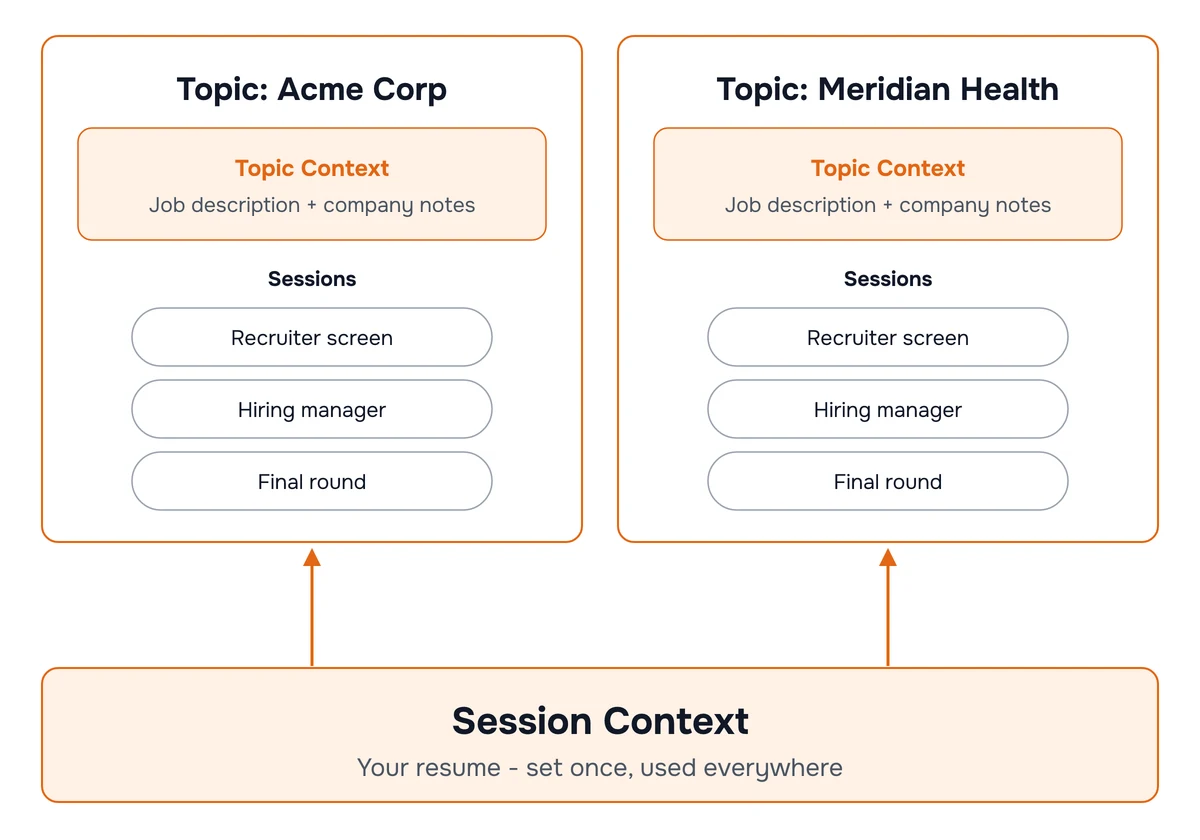
Add more than the posting as you learn it: interviewer names and roles, what the company emphasized, anything you were asked to prepare. Grouping the rounds also lets Hedy connect them during the conversation, so it can help you stay consistent with what you said in round one and remind you of concerns that were raised before they come up again.
Free accounts include one topic, which covers one active company. Pro accounts have unlimited topics, one per company you are interviewing with.
Step 4: Start Your Interview
Hit start and focus on the conversation. Hedy listens in the background and does not need anything from you during the interview.
Automatic suggestions appear on their own as the conversation unfolds. Glance down when you have a moment. Hedy is deliberately selective: it shows one to three suggestions at a time, and only when they are worth interrupting your focus for. They show up at the moments that matter most to a candidate:
-
Stronger answers when the response you are giving could be sharper, clearer, or backed by a specific example
-
Missed selling points when the topic is an opening for a relevant skill or achievement you have not mentioned yet
-
Smart questions when a thoughtful question would show engagement and get you information you need
-
Rapport and fit when there is a natural moment to connect with the interviewer or show you would fit the team
-
Consistency across rounds when something in this conversation connects to an earlier round, so you stay consistent with what you said before and follow up on concerns that were raised
Quick Actions You Can Tap Anytime
When you want specific help in the moment, tap a quick action. The full list is in the Job Interview quick prompts reference. There are five categories:
Answer Strong
-
Get a structured outline for the question you were just asked
-
Pull a specific example from your background, shaped into a STAR story
-
Weave your key strengths into the answer you are already giving
Showcase Value
-
Connect your experience directly to a need they just described
-
Surface a quantified achievement that fits the current topic
-
Demonstrate depth in your field, and show you would fit their culture
Build Rapport
-
Find genuine common ground with your interviewer
-
Express enthusiasm tied to specifics, not generic excitement
-
Ask an insightful question that shows you have done your research
Navigate Challenges
-
Ask for clarification on a vague or multi-part question
-
Address a resume gap or missing skill honestly, then pivot to your strengths
-
Buy a few seconds of thinking time without seeming unprepared
Close Strong
-
Summarize your fit in two or three sentences as the interview winds down
-
Ask about next steps and their decision timeline
-
Leave a memorable final impression
Step 5: Review Your Results
After the interview, Hedy generates two outputs built for what a candidate actually needs next:
Session Summary (Recap)
-
Summary with an honest read on how the interview went and the overall impression you left
-
Key points covering the questions you were asked and how you answered, the skills discussed, cultural-fit signals, tough moments, your strongest responses, where an answer could have been better, and what you learned about the role and company
-
Action items such as points to emphasize in your thank-you note, things to research before the next round, and areas to prepare
-
Your to-dos with due dates, like “Send thank-you email to Dana by tomorrow”
Detailed Notes
A complete second-person record of the interview (“You mentioned…”, “You explained…”) with dedicated sections for:
-
Interview Flow and Questions, with the questions captured close to verbatim
-
Technical/Role-Specific Discussion and Behavioral Questions and Responses, including which of your stories resonated
-
Company Culture and Team Insights, including any red flags you should weigh
-
Role Expectations and Responsibilities, what the job actually involves day to day
-
My Performance Assessment, an honest look at where you were strong and which moments could have gone better
-
Next Steps and Timeline and Follow-up Actions, including any homework for the next round
What Hedy Will Never Do
-
Join your call as a bot. Hedy runs privately on your own device. Nothing joins the meeting, and the interviewer sees nothing.
-
Answer for you. Suggestions are outlines and talking points drawn from your background. You choose what to say and how to say it. Hedy is a coach, not a teleprompter feeding you a script.
-
Invent experience. Examples and achievements come from the resume and context you provided and from what is said in the conversation, not from imagination.
-
Report on you. The performance assessment is for your eyes. Nothing is shared with the company, the recruiter, or anyone else.
Recording audio is a separate, optional setting in Hedy, and interviews are exactly the kind of conversation where consent rules can apply. If you turn it on, read recording laws and consent first.
Tips for Best Results
-
Context is everything. The resume in your session context and the job description in the topic are the difference between coaching built on your career and generic interview tips.
-
Update the topic context between rounds. Add the names you met, what they emphasized, and any hesitation you sensed, so the next round’s coaching accounts for it. Your session context stays untouched.
-
Read My Performance Assessment while it is fresh. It is honest by design. Over several interviews it shows you the patterns worth fixing, not just how one conversation went.
-
Stay present. The suggestions will be there when you glance down. Do not read mid-answer. Eye contact and presence matter more than any prompt.
Pro tip: Send your thank-you note the same day, while the details are still specific. The recap’s action items tell you what to emphasize, and the detailed notes give you the exact topics and names to reference, which is what makes a thank-you note read as genuine rather than templated.

