

Understanding Cloud vs Local Storage
Data Storage Fundamentals
Choosing how and where your conversation data is stored is crucial for privacy, accessibility, and peace of mind. Hedy offers two primary storage options to meet different user needs.
Where your session data is stored depends on a choice you made when you created your account. Hedy asks you to pick between syncing across your devices and keeping sessions on this one, and you can change it later in Settings. With Cloud Sync off, session data stays on the device that captured it, and reaches our secure cloud servers only when you explicitly share a session.
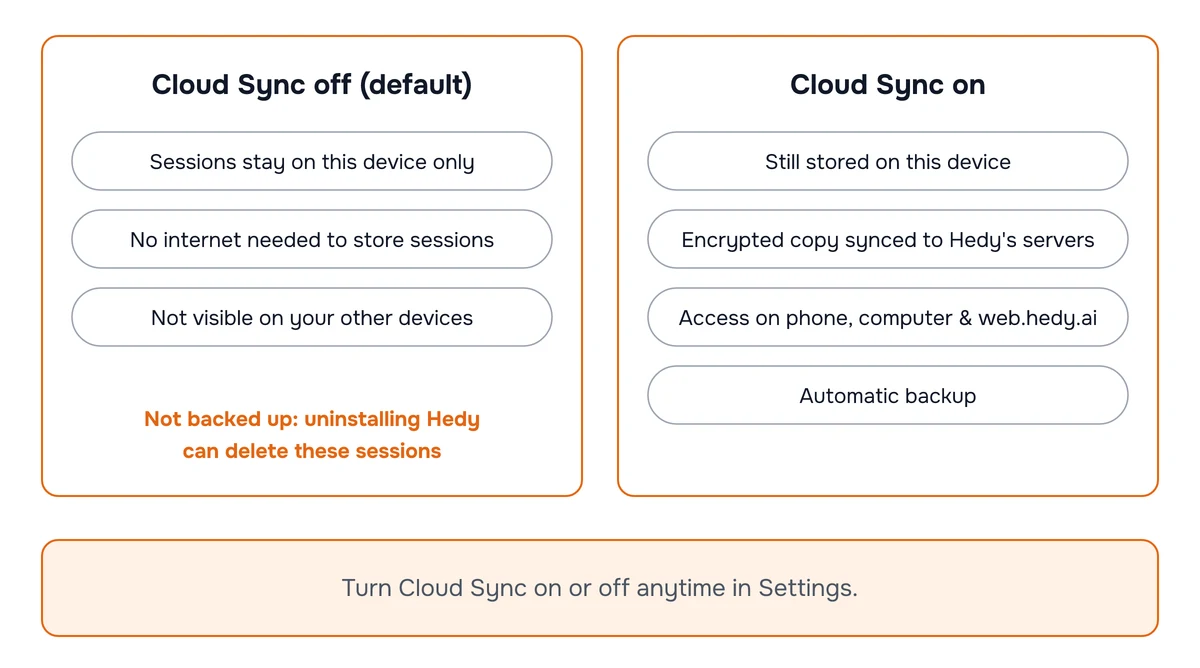
What is Local Storage?
-
Definition
-
Data stored directly on your device
-
No internet connection required
-
Kept only on your device (cloud AI analysis is a separate setting)
-
-
Key Characteristics
-
Faster access to data
-
Limited to a single device
-
Local Storage is ideal for users who prioritize privacy and don’t need to access their data on other devices.
Hybrid Approach: You can switch between modes as your needs change!
What is Cloud Storage?
-
Definition
-
Data stored on secure remote servers
-
Accessible from multiple devices
-
Synchronized across platforms
-
-
Key Characteristics
-
Access from phone, tablet, or web
-
Automatic backup
-
Seamless synchronization
-
Cloud Storage Features:
Sync sessions between devices
Access sessions on web.hedy.ai
Automated backups
Enhanced collaboration tools
Privacy and Security
-
Local Storage Security
-
With Cloud Sync off, session data stays on your device unless you explicitly share that session
-
Cloud AI analysis still processes transcript content transiently by default, unless you enable Local AI Processing
-
-
Cloud Storage Security
-
Encryption of data
-
Secure data centers
-
Compliance with privacy regulations
-
Regular security audits
-
For a detailed look at our cloud infrastructure and encryption, see Data Storage & Security.
Hedy’s Privacy Commitment:
✓ No selling of personal data
✓ User control over data
✓ Transparent data handling
✓ Ability to delete data anytime
Choosing Your Storage Mode
When to Choose Local Storage
-
Maximum privacy is your priority
-
Storing sensitive conversations
-
Minimal need for cross-device access
For on-device AI analysis as well, see Local AI Processing.
When to Choose Cloud Storage
-
Need access across multiple devices
-
Want web interface (web.hedy.ai)
-
Require automatic backups
If synced sessions don’t appear on another device, see Sessions Not Syncing Between Devices.
If you chose local storage and delete the Hedy app or its data, all your session data will be permanently removed.
Storage Decision Checklist:
✓ Understand your usage pattern
✓ Consider future needs
✓ Change your settings as you grow
Next Steps
Explore both storage modes, experiment with settings, and find the perfect balance for your workflow.

