

How to Use Hedy for Coaching and Mentoring
Coaching runs on two things Hedy is good at: asking the question you did not think of, and remembering what your client said three sessions ago. This guide walks you through setting up Hedy’s Coaching & Mentoring session type so it does both.
It fits video calls on your desktop and in-person sessions with your phone on the table. Phone calls are the exception: Hedy cannot capture a call on the same phone that is taking it, on either iPhone or Android. If you coach by phone, take the call on your Mac, or put it on speakerphone and run Hedy on a second device. Recording phone calls explains why and walks through the options.
The setup below matters more here than in most session types, because coaching is a relationship that runs over months, and Hedy needs to know who it is listening to.
Step 1: Select the Coaching & Mentoring Session Type
Before your first session:
-
Open Settings and go to the Sessions tab
-
Select Coaching & Mentoring as your session type
This tells Hedy that you are the coach and the other person is your client. Suggestions become questions you might ask rather than answers you might give, and the notes are written around your client’s development rather than your performance.
Step 2: Put Your Practice in the Session Context
This is the reusable half of your setup, the part that stays true no matter which client you are sitting with. Tap Session Context, write it once, and save it as a custom context. Every session with every client starts from it.
What belongs here:
Who you are and how you coach
Your role, whether you coach or mentor or both, and the approach you work from. A coach trained in a particular model gets suggestions shaped by it rather than generic ones.
The population you work with
Executives, founders, graduate students, new managers. This changes what a useful question sounds like.
How you want your sessions handled
Anything about the way you work that should apply every time. If you always close with a commitment, say so, and Hedy will listen for it.
Example session context: “I am an academic coach working one to one with graduate students on research progress, supervision relationships, and thesis planning. I coach rather than advise: I want questions that help the student reach their own conclusions. Every session ends with one concrete commitment before next time.”
Notice what is not in there: any individual client. They change from session to session, so they live one level up, in the topic.
Step 3: Create a Topic for Each Client
This is the step that makes Hedy useful for coaching rather than just present for it. Every client gets their own topic:
-
Create a topic named after the client
-
Add every session with that client to it
-
Open the topic, tap Edit, and put the client’s details into the context field
That third part is Topic Context, and it applies automatically to every session inside the topic. Start with the client’s name, then add what you would want a colleague to know before covering a session for you: what they are working toward, the constraints they are under, the patterns you have noticed, anything sensitive to handle carefully.
Naming the client here matters more than it looks. Hedy already knows you are the coach from the session type, but when it has to decide whose name goes on the recap, the standing note in the topic is what it trusts instead of falling back to yours.
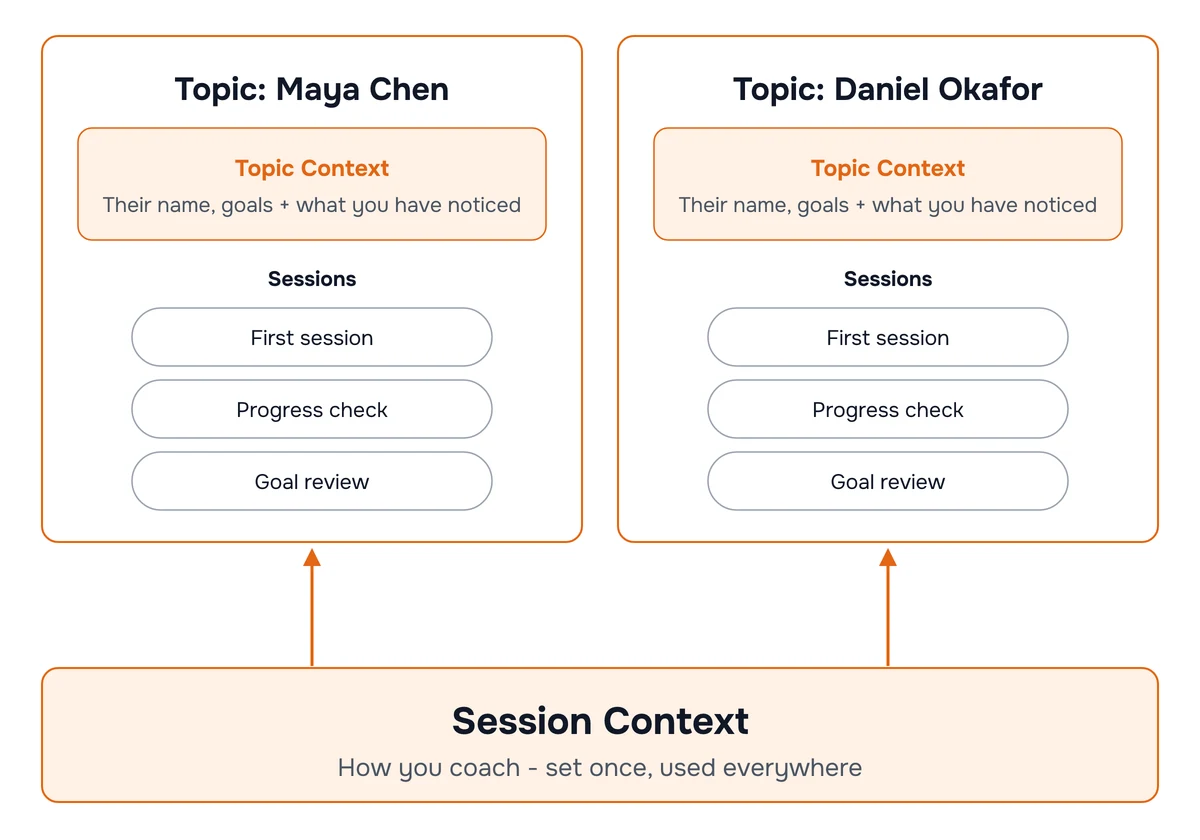
Because the sessions are grouped, Hedy can also work across them. It can notice that a commitment from last month has come up again, that a theme keeps recurring, or that the thing your client called impossible in session two is the thing they just did.
Free accounts include one topic, which covers one active client. Pro accounts have unlimited topics, one per person you coach.
Step 4: Coach the Session
Start the session and forget about it. Hedy listens in the background and needs nothing from you while you work.
Automatic suggestions appear on their own. They are deliberately sparse, one to three at a time and only when they are worth pulling your attention away from your client. For coaching they arrive as:
-
A deeper question when the conversation has opened something worth following and a sharper question would go further than the one you were about to ask
-
An opening for self-discovery when your client is close to reaching something themselves and needs space rather than input
-
Accountability when a commitment is forming and could be made specific, measurable, or timed
-
Presence when the dynamic in the room needs attention, including the moments where saying nothing is the stronger move
-
A thread from an earlier session when something here connects to a previous breakthrough, an old commitment, or a pattern worth naming
Quick Actions You Can Tap Anytime
When you want help in the moment, tap a quick action. The full list is in the Coaching & Mentoring quick prompts reference, grouped by what you are trying to do:
Powerful Questioning for a question that challenges an assumption, connects the situation to your client’s values, shifts them from problem to possibility, or offers a different lens.
Client-Led Discovery for a reflection that captures the meaning underneath what they said, so they feel heard and hear themselves.
Goal Clarification for turning something vague into something the two of you can actually work on.
Action Planning for converting insight into a commitment before the session ends.
Progress Assessment for checking movement against what they said they wanted.
Coach Development for feedback on your own practice rather than on the client.
Step 5: Review What Came Out of It
Afterwards, Hedy produces two documents.
Session Summary (Recap), titled with your client’s name and the theme of the session, containing:
-
Overview of what you explored together
-
Insights and Progress, the realizations and shifts, connected back to your client’s goals
-
Commitments and Next Steps, the things your client actually committed to, in their own terms
-
Your to-dos, which hold only what you personally need to do, like preparing a reflection question for next time. Your client’s commitments stay in the recap where they belong, and do not turn into tasks on your list.
Detailed Notes, a fuller developmental record with sections for Context and Starting Point, Key Insights and Discoveries, Questions and Reflections, Action Steps and Commitments, Progress and Achievements, Resources and Support, and Next Session Focus. When your client mentions something personal, a milestone or an interest or something going on at home, it collects in a People & Context section so you can pick it up next time instead of half-remembering it.
What Hedy Will Never Do
-
Join your call as a bot. Hedy runs privately on your own device. Nothing appears in the meeting, and your client sees nothing.
-
Coach your client for you. Suggestions are questions and openings. You decide what to ask, when, and whether to ask anything at all.
-
Turn your client’s commitments into your to-dos. The distinction between what they committed to and what you owe them is kept deliberately.
-
Give advice it invented. Insights come from what was actually said and from the context you provided, not from a library of coaching platitudes.
Coaching conversations are confidential by nature, and audio capture is a separate optional setting in Hedy. If you turn it on, read recording laws and consent first and agree it with your client.
Tips for Best Results
-
Update the topic context after each session. Two lines about what shifted is enough. It compounds: by session six, Hedy is working from a real picture of your client rather than a first impression.
-
Keep the client’s name in the topic context current. If you coach two people with the same first name, use surnames. Hedy uses what you wrote there to work out who is who.
-
Let the silence happen. The suggestion will still be there in ten seconds. A question you ask because it appeared on a screen lands differently from one you asked because you were listening.
-
Read Next Session Focus before you start the next one. It is the cheapest preparation available, and it is written from the session rather than from memory.
Pro tip: When a client says something that surprises you, put it in your session notes in their own words while it is fresh. Hedy prefers your notes over the transcript for names, spellings and wording, so what reaches the recap is what you wrote down rather than what the transcription heard.

